
Spreadsheet Risk Issues

It is interesting to note that the riskiness of operational spreadsheets are overlooked even by companies with high standards of risk management. Only when errors amount to actual losses do they realize that these risks have been staring them in the face all along.

Common spreadsheet risk issues

Susceptibility to trivial manual errors

Due to the fundamental structure of spreadsheets, a slight change in the formula or value in any of their inhabited cells may already affect their overall output. An

  • accidental copy-paste,
  • omission of a negative sign,
  • erroneous range selection,
  • incorrect data input or
  • unintentional deletion of a character,cell, range, column, or row

are just some of the simple errors spreadsheet users frequently encounter. Rarely are there any counter-checking controls in place in a spreadsheet-based activity and manual errors therefore easily go undetected.

Possibility of the user working on the wrong version

How do you store spreadsheet files?

Since the most common reports are usually generated on a monthly basis, users tend to store them using variations of these two configurations:
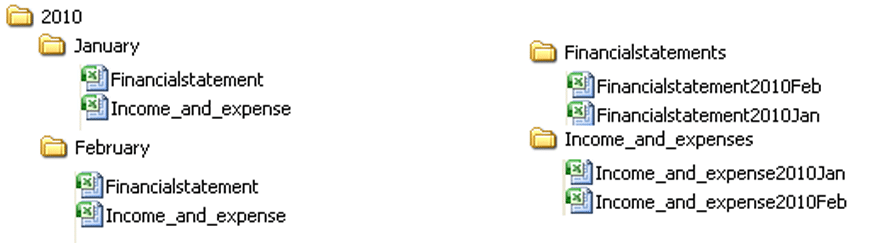
spreadsheet storage

If you notice, a user can accidentally work on the wrong version with any of these structures.

Prone to inconsistent company-wide reporting

This happens when a summary or ?final? spreadsheet is fed information by different departments coming from their own spreadsheets. Even if most of the data in their spreadsheets come from one source (the company-wide database), erroneous copy-pasting and linking, or even different interpretations of the same data can result to contradicting information in the end.

Often defenceless against unauthorised access

Some spreadsheets contain information needed by various individuals or department units in an organisation. Hence, they are often shared via email or through shared folders in a network. Now, because spreadsheets don’t normally use any access control, any user can easily open a spreadsheet file and view or modify the contents as he wishes.

Highly vulnerable to fraud

A complex spreadsheet system with zero or very minimal controls provides the perfect setting for would-be fraudsters. Hidden cells with malicious formulas and links to bogus information can go unnoticed for a long time especially if the final figures don’t deviate much from expected values.

Spreadsheet risk mitigation solutions may not suffice

Inherent complexity makes testing and logic inspection very time consuming

Deep testing can uncover possible errors hidden in spreadsheet cells and consequently mitigate risks. But spreadsheets used to support financial reporting are normally large, complex, highly-personalised and, without ample supporting documentation, understandably hard to follow.

No clear ownership of risk management responsibilities

There?s always a dilemma when an organisation starts assigning risk management responsibilities for spreadsheets. IT personnel believe users in the business side of the organisation should be responsible since they are the ones who create, edit, store, duplicate, and share the spreadsheet files. On the other hand, users believe IT should be responsible since they have always been in-charge of managing IT infrastructure, applications, and files.

To get rid of spreadsheet risks, you’ll have to get rid of spreadsheets altogether

One remedy is to have a risk management activity that involves both IT personnel and spreadsheet users. But wouldn’t you want to get rid of the complexity of having to distribute the responsibilities between the two parties instead of just one?

Learn more about Denizon’s server application solutions and how you can get rid of spreadsheet risk issues.

More Spreadsheet Blogs


Spreadsheet Risks in Banks


Top 10 Disadvantages of Spreadsheets


Disadvantages of Spreadsheets – obstacles to compliance in the Healthcare Industry


How Internal Auditors can win the War against Spreadsheet Fraud


Spreadsheet Reporting – No Room in your company in an age of Business Intelligence


Still looking for a Way to Consolidate Excel Spreadsheets?


Disadvantages of Spreadsheets


Spreadsheet woes – ill equipped for an Agile Business Environment


Spreadsheet Fraud


Spreadsheet Woes – Limited features for easy adoption of a control framework


Spreadsheet woes – Burden in SOX Compliance and other Regulations


Spreadsheet Risk Issues


Server Application Solutions – Don’t let Spreadsheets hold your Business back


Why Spreadsheets can send the pillars of Solvency II crashing down

?

Advert-Book-UK

amazon.co.uk

?

Advert-Book-USA

amazon.com

Contact Us

  • (+353)(0)1-443-3807 – IRL
  • (+44)(0)20-7193-9751 – UK

Check our similar posts

Web Design and Development

The first few seconds of a first-time website visitor is very crucial. If they don’t like what they see or if they think it takes too long just to load what they’re supposed to see, chances are, that would be the last time you’d ever catch them on your site.

Therefore, striking a balance between your website’s appearance and its loading speed is important for first impressions. Once you’ve captured the visitor’s attention, the next objective is to keep them glued long enough for them to browse through your merchandise. It is at this point that the benefits of a well organised and highly intuitive graphical user interface come into play.

An excellent combination of stylish web design and sharp web development can play a major role in lowering bounce rates and increasing returning visitors. We see to it that our web designers and developers not only excel at what they do individually, but also understand the interplay between their individual creations and how it affects the overall appeal of the website.

This is what you can expect from our brand of web design and development:

  • Conversion-motivated web design. Since we understand that your primary motivation for entering into the eCommerce arena is to turn torrential web traffic into sales, we’ve put conversion as a primary consideration in our web designs.
  • SEO-friendly content. First-time visitors don’t reach your site because they entered your URL somewhere. Rather, they must have stumbled upon your links on search engine results or on other websites.
  • Engaging web content. Because excellent graphics alone can’t sell products but engaging web content can, we invest in excellent copywriters.
  • Visitor-friendly user interface. Before a visitor will ever read content on the current and succeeding pages, they’ll need to interact with your site’s UI first. We’ll make sure your user interface is visually appealing enough to invite visitors to click on your buttons.
  • Superior expertise in web development technologies. Our web developers are certified experts in web related technologies including Javascript, AJAX, SQL, PHP, CSS, Java, Silverlight, CMSes, and Magento, among others. Thus, we can offer extreme flexibility and scalability in our web development services.

See more related services

Spreadsheet Reporting – No Room in Your Company in an Age of Business Intelligence

It doesn’t take a genius to understand why spreadsheet reporting still pervades the enterprise despite the rise of a complex but highly effective IT solution known to big shot CIOs as Business Intelligence or BI.

If you’re still in the dark as to what BI is, don’t worry because we?ll enlighten you shortly.

Business decisions from disparate data sources

In the meantime, let’s talk about how you make business decisions. If you’re a top executive, then you make decisions based largely on reports submitted to you by your managers, department heads, and so on. They in turn obtain information from different sources, like the company ERP and CRM as well as other external sources (e.g. market surveys).

Now, before their reports ever reach your desk, a lot of data is extracted, shared, filtered, analysed, consolidated, and summarised so that they become actionable information. In all these activities, one software tool gets to take part in most of the action – the spreadsheet.

The problem with spreadsheet reporting

The problem with spreadsheets is that they have very poor built-in controls. Thus, they are susceptible to human errors and are vulnerable to fraud. What’s more, collecting data and manually consolidating them into spreadsheets can be very laborious and time consuming.

If you don’t get accurate, reliable information, your judgement will be fuzzy and your business decisions compromised. In addition, if you don’t receive the information you need on time, your business will constantly be at risk of breaching critical thresholds, which may even force it to spin out of control.

Business Intelligence – actionable information on time

This is mainly the reason why large companies implement Business Intelligence systems. BI systems are equipped with built-in features like reports, dashboards, and alerts.

Reports consolidate data and present them in a consistent format composed of intuitive text, graphs, and charts. The main purpose of having a consistent format is so that you will know what kind of information to expect and how the information is arranged. That way, you don’t waste time searching or making heads or tails out of the data in front of you.

Dashboards, on the other hand, present information through visual representations composed of graphs and gauges that are aimed at tracking your business metrics and goals. The main function of dashboards is to feed you with actionable information at a glance.

Finally, alerts keep you informed when certain conditions are met or critical thresholds are breached. Because their main purpose is to prompt you at the soonest possible time wherever you are, a typical alert can come in the form of an SMS message or an email.

As you can see, all three features are designed to get you making well-informed decisions as quickly as possible.

The problem with Business Intelligence and the alternative solution

The usual problem with full BI systems is that they can be very costly. Hence, if your organisation does end up implementing one, chances are, not everyone under you will be able to access it. As a result, some departments will be forced to go back to using spreadsheets.

If your company cannot afford a full BI system, then that probably means you don’t need one. What you need is a more affordable alternative. There are actually Software as a Service (SaaS) Business Intelligence solutions that may not be as comprehensive as a full BI system, but which may suffice for small and mid-sized businesses.

The disadvantages of spreadsheets are more damaging than you could have ever expected. Be free of it now.


More Spreadsheet Blogs


Spreadsheet Risks in Banks


Top 10 Disadvantages of Spreadsheets


Disadvantages of Spreadsheets – obstacles to compliance in the Healthcare Industry


How Internal Auditors can win the War against Spreadsheet Fraud


Spreadsheet Reporting – No Room in your company in an age of Business Intelligence


Still looking for a Way to Consolidate Excel Spreadsheets?


Disadvantages of Spreadsheets


Spreadsheet woes – ill equipped for an Agile Business Environment


Spreadsheet Fraud


Spreadsheet Woes – Limited features for easy adoption of a control framework


Spreadsheet woes – Burden in SOX Compliance and other Regulations


Spreadsheet Risk Issues


Server Application Solutions – Don’t let Spreadsheets hold your Business back


Why Spreadsheets can send the pillars of Solvency II crashing down

?

Advert-Book-UK

amazon.co.uk

?

Advert-Book-USA

amazon.com


Can you do away with the Project Initiation Meeting?

Project initiation meetings are often skipped to fast-track projects. Once a sponsor is found, organisations go straight to project planning and execution. But based on our own experience, holding a project initiation meeting can actually eliminate many issues that may crop up in the future and hence may speed things up instead in the long run.

It is in the project initiation meeting where your project objectives and scope are clarified and all stakeholders are brought to the same page. Project sponsors and stakeholders will have to know in a nutshell what is needed from them, what the possible risks are, what different resources are required, and so on. So that, when it’s time to proceed to the next phase, everyone is already in-sync.

So what are taken up in such a meeting? Perhaps an actual example can help. Sometime in the past, we set out to work on an eCommerce website project. After conducting the project initiation meeting, these were some of the things we were able to accomplish:

  • Identified deliverables e.g. site design, interface to payment system, etc.
  • Come up with the project phases
  • Agreed what should be in and out of scope
  • Defined the acceptance test criteria
  • Identified possible risks
  • Identified the possible training and documentation work needed
  • Established whether any analysis was required, e.g. as with regards to payment interfaces
  • Formulated disaster recovery plans
  • Defined roles and responsibilities
  • Drafted timelines and due dates

Aren’t these covered in project planning? If the project is a big one, the answer is no. In a large project, project planning is a much more exhaustive activity. In a project initiation meeting, only the basic framework is defined.

Some questions may still remain unanswered after a project initiation meeting, but at least you already know what answers you need to look for. In the example we gave earlier, we left the meeting knowing that we needed:

  • a list of all necessary hardware to estimate the costs
  • to identify possible dependencies we might have with third parties
  • to identify what software had to be bought and what skills we needed to hire

When it was time to proceed to project planning, everyone involved already knew what direction we were taking. In effect, by not skipping the project initiation meeting, we were able to avoid many potential obstacles.

Ready to work with Denizon?
