
A Definitive List of the Business Benefits of Cloud Computing

When you run a Google search for the “benefits of cloud computing”, you’ll come across a number of articles with a good list of those. However, most of them don’t go into the details, which nevertheless might still suit some readers. But if you’re looking for compelling business reasons to move your company’s IT to the cloud, a peripheral understanding of what this technology can do for you certainly won’t cut it.

Now, cloud computing is not just one of those “cool” technologies that come along every couple of years and which can only benefit a particular department.?What we’re talking about here really is a paradigm shift in computing that can transform not only entire IT infrastructures but also how we run our respective organisations.

I hate to think that some people are holding back on cloud adoption just because they haven’t fully grasped what they’re missing. That is why I decided to put together this list. I wanted to produce a list that would help top management gain a deeper understanding of the benefits of the cloud.

Cloud computing is one bandwagon you really can’t afford not to jump into. Here are ten good reasons why:

1.?Zero?CAPEX and low TCO for an enterprise-class IT infrastructure

2. Improves cash flow

3. Strengthens business continuity/disaster recovery capabilities

4. Lowers the cost of analytics

5. Drives business agility

6. Ushers in anytime, anywhere collaboration

7. Enhances information, product, and service delivery

8. Keeps entire organisation in-sync

9. ?Breathes life into innovation in IT

10. Cultivates optimal environments for development and testing

Zero CAPEX and low TCO for an enterprise-class IT infrastructure

Most cloud adopters with whom I’ve talked to cite this particular reason for gaining interest in the cloud.

Of course they had to dig deeper and consider all other factors before ultimately deciding to migrate. But the first time they heard cloud services could give them access to enterprise class IT infrastructures without requiring any upfront capital investment, they realised this was something worth exploring.

A good IT infrastructure can greatly improve both your cost-effectiveness and your capability to compete with larger companies. The more reliable, fast, highly-available, and powerful it is, the better.

But then building such an infrastructure would normally require a huge capital investment for networking equipment, servers, data storage, power supply, cooling, physical space, and others, which could run up to tens or even hundreds of thousands of euros. To acquire an asset this costly, you’d have to take in debt and be burdened by the ensuing amortisation.

If you’ve got volumes of cash stashed in your vault, cost might not be a problem. But then if you really have so much savings, wouldn’t it be more prudent to use it for other sales-generating projects? An extensive marketing endeavour perhaps?

A capital expenditure of this magnitude and nature, which normally has to be approved by shareholders, can be regarded as a high financial risk. What if business doesn’t do well and you wouldn’t need all that computing power? What if the benefits expected from the IT investment are not realised??You cannot easily convert your IT infrastructure into cash.

Remember we’re talking about a depreciating asset. So even assuming you can liquidate it, you still can’t hope to sell it at its buying price. These factors are going to play in the minds of your Board of Directors when they’re asked to decide on this CAPEX.

Incidentally, these issues don’t exist in a cloud-based solution.

A cloud solution typically follows a pay-as-you-go utility pricing model where you get billed monthly (sometimes quarterly) just like your electricity. ?In other words, it’s an expense you’ll need to pay for?at the end of a period over which the service’s value would have already been realised. Compare that with a traditional infrastructure wherein you’ll have to spend upfront but the corresponding value will still have to be delivered gradually in the succeeding months or years.
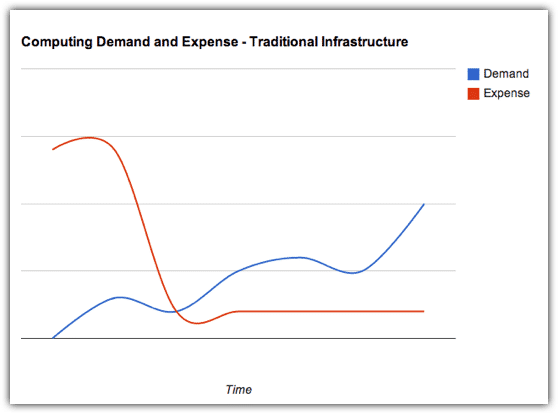
demand expense traditional infrastructure

From the point of view of your CFO, what could have been a CAPEX to acquire an asset that depreciates with time (and consequently reduces your company’s net worth), becomes a flexible operating expense (OPEX).?Truly, it is an operating expense that you can increase, decrease, or even totally discontinue, depending on what the prevailing business conditions demand.
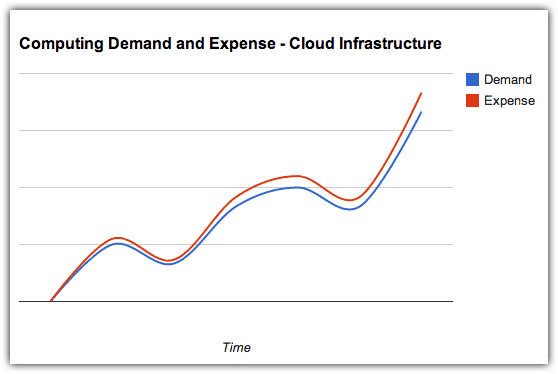
demand expense cloud infrastructure

People who think they have done the math in comparing cloud-based and traditional IT infrastructures claim that, although they see how cloud solutions transform CAPEX into OPEX, they really don’t see any significant difference in overall costs.

However, these people have only gone as far as adding up the expected monthly expenses of a cloud solution over the estimated duration of an equivalent IT infrastructure’s effective lifespan and comparing the sum with that IT infrastructure’s price tag. You won’t get a clear comparison that way.

You need to consider all factors that contribute to the infrastructure’s Total Cost of Ownership (TCO). Once you factor in the costs of electricity, floor space, storage, and IT administrators, the economical advantages of choosing a cloud solution will be more evident. Add to that the costs of downtime such as: interruptions to business operations, technical support fees, and the need to maintain expensive IT staff who spend most of their time “firefighting”, and you’ll realise just how big the savings of cloud adopters can be.

Still not convinced? Well, we’re still getting started.?On our next post, we’ll take a closer look at the additional benefits of paying under an OPEX model instead of a CAPEX model.

Contact Us

  • (+353)(0)1-443-3807 – IRL
  • (+44)(0)20-7193-9751 – UK

Check our similar posts

EcoVaro ? ESOS Solution on a Cloud

The UK?s Energy Saving Opportunity Scheme ? and all others in the EU stable – is bound to generate huge quantities of data beyond the reach of processing on standalone computers. This leaves some companies in the mandatory sector between a rock and a hard place. They already have to divert scarce talent to draft compliance reports. Now they face purchasing equipment with big data processing power.

The more astute are turning to cloud computing solutions like EcoVaro in increasing numbers. They are also keen to benefit from remote secure backup. .

Increasing migration to public clouds has caused a growth in niche big data consultants. EcoVaro is one of these. We want to do more than simply open up a port and leave you to become familiar with our technology. We service a growing group of companies who want us to analyse their energy usage reports, and isolate the main demand drivers so they know where to start saving.

We are consumer-centric energy consultants with the emphasis on corporates and sme?s. We offer more than just big data processing facilities. We also help set up your dashboard and are full of practical ideas you can use to start trimming energy costs right away. So please treat us as your affordable energy partner who really wants to help.

Finally, contact EcoVaro for a discussion.

Contact Us

  • (+353)(0)1-443-3807 – IRL
  • (+44)(0)20-7193-9751 – UK
Field service and its impact on your bottom line

There are many pointers to successful field service in any business. Generally, labour hours, parts, technician efficiency, performance indicators and other bunch of data are the most important. However, the icing on top is the total revenue. If you are in business, you must be cocksure that it’s making money, and when you don’t rake in enough you need to make some business decisions quick!

For the most part, field service companies will always have a field service management software to handle all the data. But how will this affect your outlook? 

Will this cause a direct increase in revenue? 

What will still need to be changed so that the ship stays afloat?

Increase your service jobs

As expected, the best field management software will guarantee a positive increase in appointments per week. On average, the field service team should expect at least a 50% increase in work turnover. There is a direct relation between the revenue you should be making and the number of calls in your schedule since the only way of making more cash is to get more work done. It is not recommended to raise costs because it increases the risk of losing customers easy when they can’t meet the extra expense. Field service software will help you bring in more customers and also manage technicians.

If you have much of the hard work done for you then you?d have more time to run the show. This is why premises are trying out software because they answer many problems like:

  • Automation and improved work order management
  • Fast dispatch from an array of drag-drop scheduling tools
  • Easy-to-use field service apps for technicians to receive and submit work orders
  • Can be integrated into account systems for faster billing time

Manual operations are costly and prone to error, and they don’t come cheap. Do away with them, reduce costs, sit back and watch as new customers steadily stream in. Grow the business by building lasting relations with your workforce and customers.

Increase technician?s abilities with mobile

If you want to get more profit, bank on technicians who complete service calls. Their task is obviously the hardest. They have an unpredictable job; at times they need to come up with quick responses or they may also be required to dig deep as well. The work does not need to be slowed with an endless paper trail while they could be elsewhere giving their all. These technicians require a working mobile field service management app.

As expected, field service leaders who use a mobile field service software report close to 20% increase in service visits per technician. This translates to each technician taking nearly a fifth more calls in a day. And as we had said before, more service calls can double the profits. How can technicians get extra time from a field service mobile app?

  • No need to drive to work to pick orders
  • Less time using the phone looking for service or parts information
  • Reduces the time needed to go through paper-based work
  • Less time driving to service calls because information is routed to their mobile phones

Increase revenue from technicians

If time is spent seamlessly, dispatchers will find time in a technician?s schedule for an extra service call. With all this being done within normal working hours, the business stands to increase its bottom line. This is what makes the business grow. Not by increasing technicians but by optimum utilisation of the current staff to get maximum profit. The logic is straightforward ? a technician working 8 hours each day taking six calls a day will make more revenue than the one who takes four, because they are paid the same each, but the business benefits from the extra service calls.


The business stands to make more revenue per technician if it uses field service management software. The margins can go as high as 40% because the technician has all tools needed to get the job done faster. You increase revenue from field work too. Let technicians benefit from automated process and have all the tools for work that they need right on their mobile devices.

The target is always your bottom line

When field service leaders inquire about field service software, they need to know how it affect the bottom line: how they will spend less time drafting schedules, how each technician will increase revenue, how the business will grow. Simple as that!
Field service management applications bring a lot to the table. 

Don’t waste your time crunching a lot of numbers or sorting out schedules since this is what such an application should do. Automation, optimisation and mobility are all ways of increasing revenue. Let us help you reach your goals using our top shelf field management software. This will not only help your bottom line but will let you have more time to venture into untapped potentials.

Top 10 Benefits of Using Field Service Automation Software

Just how much wastage is witnessed in your operations? Each morning your technicians report to work, they receive the day?s schedule, go through the inventory for the parts and tools that will be required, collect and fill the paperwork, before finally hitting the road- translating to hours of manual organisation. What of the information they need when they are at the site? Are they carrying around bulky files on each individual customer? Your field technicians are also responsible for lots of the equipment being handled- and you want to keep a tab on it all- knowing what is being worked on, when it is happening, how long it takes, and the materials that have been used. Dealing with all this on your end through loads of Excel sheets, calculating and updating time logs, and ticking off the inventory- it can be a strain. Field Service Automation Software comes in to handle it all- from the scheduling and tracking, to inventory control and invoicing- all on the same platform.

Eliminating the Paperwork and Optimising Your Operations

There has been a surge in demand for all-in-one Field Service Management (FSM) solutions. They leverage the power of mobile technology, cloud computing and social collaboration to boost the efficiency of field services. In fact, the FSM market is growing at rates never seen before, if the recent statistics are anything to go by. According to the latest estimates, it is worth $3.5 billion and is expected to hit $5.9 billion by 2024.

It’s understandable why this is happening. Technology is advancing, and we all know it’s every entrepreneur?s dream to optimise the use of the available resources while guaranteeing customer satisfaction. If technology can deliver this through automation, why not? Every business now wants to automate things, and the focus is to maximise resource output. You should, therefore, not be surprised to see the FSM software industry booming. If you just considered the field service industry, you’ll realise that there are so many software applications to help with service automation, whether full or partial.

A good example is FieldElite, which helps with the management of field workers. From your desktop or the palm of your hands, on a tablet or smartphone, you can take full control of your field workers, manage scheduled jobs, and use maps to manage work assignments for the already dispatched field workers. Not only does FieldElite help you handle tasks in an accountable manner but also provides options for accounting and reports, all managed in an easy to use dashboard.

10 Benefits Field Service Automation Software Brings On Board

Why would organisations need to invest in a Workforce management app? Below are some of the key benefits of using a Field Service Management software:

1. Cut down the down-time and make every minute count

From scheduling your operations, mapping out preferred routes, dispatching the service team, to staying connected with them throughout the tasks, you get to improve worker efficiency with field service software like FieldElite. 

Most FSM software programs allow the administrator to send tasks directly to the field worker?s mobile. More often than not, the FSM software provides vital information, including service history, optimal route to the site, the tools required, and contact numbers, among other details.

This improves efficiency by ensuring that the client’s needs are taken care of promptly. Where it’s about machine maintenance, the downtime would be as short as possible.

2. Enhance professionalism and boost your brand image

FSM software programs are known for ensuring professionalism in the manner in which business activities are conducted. Of course, professionalism is attained through several factors, including working with a team of professionals. Such a team, using FSM software, results in enhanced efficiency and excellence.

A field service software like FieldElite helps you to consolidate all your business information into a single central database. With different access levels, your employees will access only as much information as is relevant to their respective duties.

An FSM software is ideal because the stored information can be accessed from any location, meaning field workers can pick new tasks while in the field, provided they’ve got the requisite tools. Instead of having to come back to the office, the employee would access all the information and execute the necessary task.

3. Resource Optimisation with Real-time Field Service Automation Software

Resource optimisation is one of the key determinants of a company?s profitability. While businesses vary in size and purpose, they all share one thing in common ? the desire to increase productivity while ensuring the optimal usage of resources.

Besides productivity, field service software also allows for efficient utilisation of the available resources to cut down on costs.

4. Stay connected with all your crew- and coordinate them better

FSM software facilitates improved coordination with the workforce. The software streamlines the management of the entire field service life cycle, ranging from labour to work orders, returns, contracts, warranties, and equipment.

The idea is to bring all the company?s field-related operations to a central point. And now, with easy data accessibility from a central platform, improved coordination is easily achievable.

5. Get accurate data and make well-informed decisions every step of the way

Adopting the field service management software is more than just a way to improve efficiency. It goes a long way towards improving a company?s accuracy. When a field service management software is used to trace a company?s activities, all the tasks are tracked on the mobile device, keeping the managers informed of every step.

Besides, the technicians also have a free reign to record the diagnostics, quality information, test results, and the parts consumed. All the information can be captured using text, audio, videos, and still photos. This guarantees minimal to no instances of data manipulation.

6. Improve Customer Satisfaction: Win Their Loyalty

Field service management software improves customer satisfaction. How does that happen? Well, using a field service software like FieldElite allows for quick response to customer queries. If there?s one thing that quickly turns your customers off, it’s delayed response to their requests. With the field service management software, however, you can respond to such requests quickly and effortlessly.

Moreover, your customers can also track the service engineer to ensure they’re well informed of any anticipated delays. With quick response time, customer machines have more reliable up-time, which is the desire of every client.

7. Flexibility ? because no one likes being tied down

If there?s one thing that customers like when dealing with a company, it’s flexibility. Instinctively, customers will always want different options to choose from when using a service without appearing to be confined to one provision. Having limited options would also appear boring.

To this extent, it would be wiser to adopt advanced FSM software. Advanced FSM software is compatible with mobile phones, meaning users can easily manage their tasks from isolated locations. FSM software can either be device-agnostic or device-specific. The device-specific type supports Android, Windows, and Apple iOS. This guarantees mobile-friendly tasks where users can easily manage the assignments via mobile application.

8. Store client history in secure cloud-based FSM software

Software like FieldElite stores client history precisely. All the past data, including order history, are stored separately and accurately. In so doing, the field technician gets easy access to the tools, specifications, and technician instructions that aid them in their operations. The result is increased productivity and on-time service delivery.

9. Asset Management and Inventory Control

Naturally, companies offering different repair services have plenty of assets to store. Accordingly, retrieving a specific part out of the large collection would be daunting.

With a field service application like FieldElite, the staff members can track down all the products effortlessly using the GPS. Furthermore, the FSM software ensures excellent maintenance of assets.

10. Improve oversight of field workers ? and keep them in the loop

The FSM software comes with many useful tools, including a built-in GPS tracker. The GPS tracker oversees the operations of the on-field workers, providing precise details about their geographical location, actual arrival time, and most importantly, the distance from the job site.

While this might not be useful at all times, it comes in handy when you need to assign an urgent task to the nearby technician. Call it a classic example of dynamic scheduling.

Final Thoughts

With so much at stake, it’s increasingly compelling to include the Field Service Management Software in your business. With every industry moving towards automation, your business cannot afford to lag.

Quick and efficient service delivery through FSM software may be the difference between you and your competitors.

The FSM software is no longer the cherry on the cake but a must-have tool for your survival in the highly competitive market.

Ready to work with Denizon?