
Why integrating your Field Service Management with IoT Applications makes sense

Your customers want a smooth experience when hiring your services. Whether there are pests that have run amok in their homes and you have been called in to exterminate them, there is a leak in the pipes and your plumbing repair business is the go-to for repairs, you’re in charge of a cleaning business with clients spanning across the residential and commercial niches, or even a locksmith making new installations and providing aftercare for their clients ? it is vital to make the process as hassle-free as possible for your customer. The priority is getting the job done in time, and to quality standards. On the other hand, your mobile workers need access to complete and accurate data to approach the task more proactively, get it done right, and increase the rate of first-time fixes.

When you have multiple clients and a huge workforce, things can get messy with all the paperwork involved. Preparing documents and reports, keying in the data, keeping track of your mobile employees, following up on current jobs and scheduling new appointments ? the workload can put a strain on your staff. Field service scheduling software like FieldElite come in to keep your central office staff abreast with all customer details, sending alerts when new issues arise. These are then relayed to the appropriate technician for the situation to be taken care of at the earliest possible time ? directing the right employee to the customer based on the skill-set availability and location. While field service job management software, by itself, is a powerful solution, you can crank things up a notch by having a system that integrates IoT into its operations.

Powering Field Service Scheduling Software Systems With IoT

FSM gives maintenance firms, distributors, manufacturers and other service businesses an interactive platform that optimises the workflow. From the customers booking maintenance work, office staff tracking operations right from their desk, workers interacting with it while on-ground through the mobile app, to the billing and invoicing ? it is all handled through the same system. IoT applications can boost this becoming a critical tool to show the field managers about the precise locations where attention is needed, for accurate worker and job scheduling and improved customer satisfaction. What if you could also have features like auto-scheduling coming on board? Let’s delve deeper into what it means for your FSM system.

Benefits Of Using Service Management Software With IoT Solutions

Its impact of IoT on field management is seen in the transformation of maintenance data into proactive service actions. Research by Gartner shows that in 2020 there will be over 20 billion connected devices, making the reach of IoT really vast. This will fuel the field management industry, unlocking more potential with the mobile workers interacting in real-time with their equipment and headquarters. This speeds up response time to service requests and transforms interoperability across the different devices.

???????? All-round access

The interaction with IoT benefits the technicians, managers, and customers themselves. For instance, while the worker on ground interacts with the FieldElite mobile app, the office staff at headquarters will be engaging them via browser on their smart devices, and even the client gets access to the system through the customer portal.

???????? Linking your different business operations

It doesn’t stop there. Integrating the mobile service management software to the IoT facilitates inventory management, automobile tracking, and even automates accounting, invoicing, and other internal processes of the business, giving you more visibility over your field assets and operations. Here, the sensors that have been enabled in the network will notify you of damaged equipment, and go further to route and dispatch the technician who is most suited to go on-site and repair it.

???????? Nip things in the bud ? A proactive approach

Updates from sensors on the remote equipment are sent over a dedicated network. This is intelligently interpreted by the IoT platform to decide the next course of action, depending on a predefined set of rules. This course of action can be assigning and dispatching the technician through the FieldElite app to fix the equipment before permanent damage occurs. This whole process is automatic, shifting the company from a reactive mode of operations to a proactive and preventative model, resulting in better utilisation of assets.

???????? Minimise time wastage

Less time is spent going checking for flaws in the systems. Take management at a wastewater treatment plant for instance. Simply place IoT sensors on the different pumps, mortars and valves to give you this data. In case of leaks or damage, the appropriate operator is alerted, taking away the need for manual monitoring. Monitoring is done remotely. Hazardous situations such as in the oil and gas industry where workers are faced with issues like flare stacks are handled better, where the IoT sensors minimise downtime and ensure that only necessary visits to the plat equipment are done.

???????? Interactions at the palm of your hand

The field service workers are also equipped with effective communications through aspects like the chat feature on the mobile app, and reporting abilities where they can make notes, take photos and relay this to the headquarters during the course of the job. Information on the system is readily available to the customer and future technicians who will be handling jobs at the facility.

How does the FSM work with other systems? FieldElite’s core role is to manage the mobile workforce. How do you keep track of the sensors of the different equipment, in order to know when maintenance is needed?

Enter ecoVaro: IoT In Energy Management

The 2018-2025 Global Building Energy Management System Analysis and Forecast showed energy consumption in residential buildings accounts for close to 40% of the world’s energy consumption.? Commercial buildings like shopping malls, hospitals, retail stores and hotels take 30%. IoT tools aid in collecting and analysing the real-time data consumption in these falsities, to improve maintenance and reduce down times. It’s a holistic view that is achieved through a network of smart devices monitoring the ventilation, humidity, air-conditioning and lighting systems.

Home automation tools like smart thermostats and bulbs are already becoming popular. Here, they bring savings to the consumers without them having to use up much effort. For broader energy management, these systems will include units like sensors, controls, meters, data analytics tools, and user-friendly applications that the consumers access all this from. It cuts across the board, from households and commercial establishments, to utility firms and government bodies keen on effectively monitoring and managing their energy resources. Industrial and commercial users need data analytics tools to maximise their productivity and reduce costs, while residents in households want to reduce their monthly bills and take a more proactive role in their energy management.

From Smart Devices To Accurate Loggers

The first step in saving energy is cutting down wastage. Smart light, humidity, temperature and air conditioning controls come in to maintain optimal indoor conditions. Lighting units, smart thermostats, sensor-based HVAC control systems are part of the IoT, taking centre stage in automatically maintaining the perfect indoor environment that will keep the building?s energy use at optimum levels. They have been designed with different sensors that check the humidity, light, motion and even CO2 levels, dynamically adjusting the conditions in the facility. Here, you have situations like smart lights dimming when there is more daylight getting into the room, and then automatically turning off when people leave the room. The smart thermostats can precool the indoor space before the day gets warmer, so that during that scorching midday sun there will be less energy spent by the HVCA to bring down the heat levels.

The whole set up ? from the LED lights adjusting to user preferences and routines, learning thermostats that reduce consumption during peak load times, sensors and data analytics that give the user more control over their consumption, creates a smart energy infrastructure, be it in homes or industrial spaces, from retail stores and factories, to entire cities. This is all geared at cutting down energy costs, with the systems automatically adjusting the building?s lighting, temperature and ventilation, to reduce the energy consumption without compromising the comfort of the building?s occupants. LEED bulbs already record 20% lower maintenance costs than the typical commercial buildings.

Adopting IoT Applications For Your EMS System

How can you take advantage of this? With the EMS loggers, you monitor your facility’s consummation in real-time. Platforms like ecoVaro enable both the utility companies and end-users to access this data. The utility firms will be in a position to tailor the power supply in response to changing demand and also adjust their pricing. The end-users, on the other hand, will be in a position to control their usage at a granular level ? responding to changing environmental conditions, power consumption, and reducing energy waste.

There are also those appliances that come with sensors, from boilers in the household, to heavy production machinery in industries. The EMS systems allow you to continuously monitor the load on the sensor-enabled assets, predict when overheating will occur and pinpoint risks of outages or damage on the line. Maintenance can then be immediately carried out to vent damages to the equipment. That way components like motors are protected from damages that would have ended up costing the firm lots of funds to replace. The data analytics from the EMS platforms enable the energy manager to strike that balance to optimise performance and reduce wear, thus prolonging the life of the equipment.

Even the heavy hitters in the energy sector get to benefit from the IoT. Take power production for instance. When you’re dealing with stations, solar farms and wind fields ? as they provide that much-needed power, they also consume energy and need plenty of maintenance. These are resource-heavy stations and as a manager, you want to keep a close eye on things. This involves a complex approach, from the sensors at the facilities, data analytics, to predictive maintenance. EMS software comes in to continuously monitor the equipment and wiring through the sensors. This enables you to prevent issues like overloads, and ensure that a balanced load is maintained on the line. The EMS goes a step further by enabling you to undertake predictive maintenance, for the timely repair of the equipment on the power grid, minimising accidents, preventing blackouts, and averting the costly down times.

Electricity utilities connecting their power plants and grids to available IoT solution networks get to be more transparent to their consumers, by showing them where the energy they use comes from. This empowers the consumers with the information needed to select the cleanest energy source during that period, which is particularly beneficial for those keen on adopting greener practices. For instance, you can have a system monitoring a network of grids, and dynamically shifting to power sources that have the least amount of emissions at the moment ? what’s gaining popularity as “automated emission reduction”. These lead to utility firms that produce clean energy getting more consumers and growing their revenue base.

Field And Energy Management: How FieldElite and ecoVaro Work Together Through IoT

So, on one hand, you have the energy managers following up on the consumption trends at their facilities, keeping an eye on their equipment.? On the other hand, you have field workers needed to carry out repair and maintenance works at different locations.? How do you join them together to ensure a seamless flow of operations?? The IoT.

This can be seen with ecoVaro and Field Elite interaction. Here, you have two independent systems that are interlinked through the internet and secure cloud systems, bringing more convenience on board for the users.

Picture this: Loggers collecting data from the meters and sensors on-site detect an anomaly, which you will immediately be able to view through the ecoVaro platform. This can be a myriad of issues, from plumbing to electrical systems that need to be worked on, and they are at multiple locations. How do you get them resolved? Dispatch your technicians through FieldElite.

Here’s a snapshot of how this works:
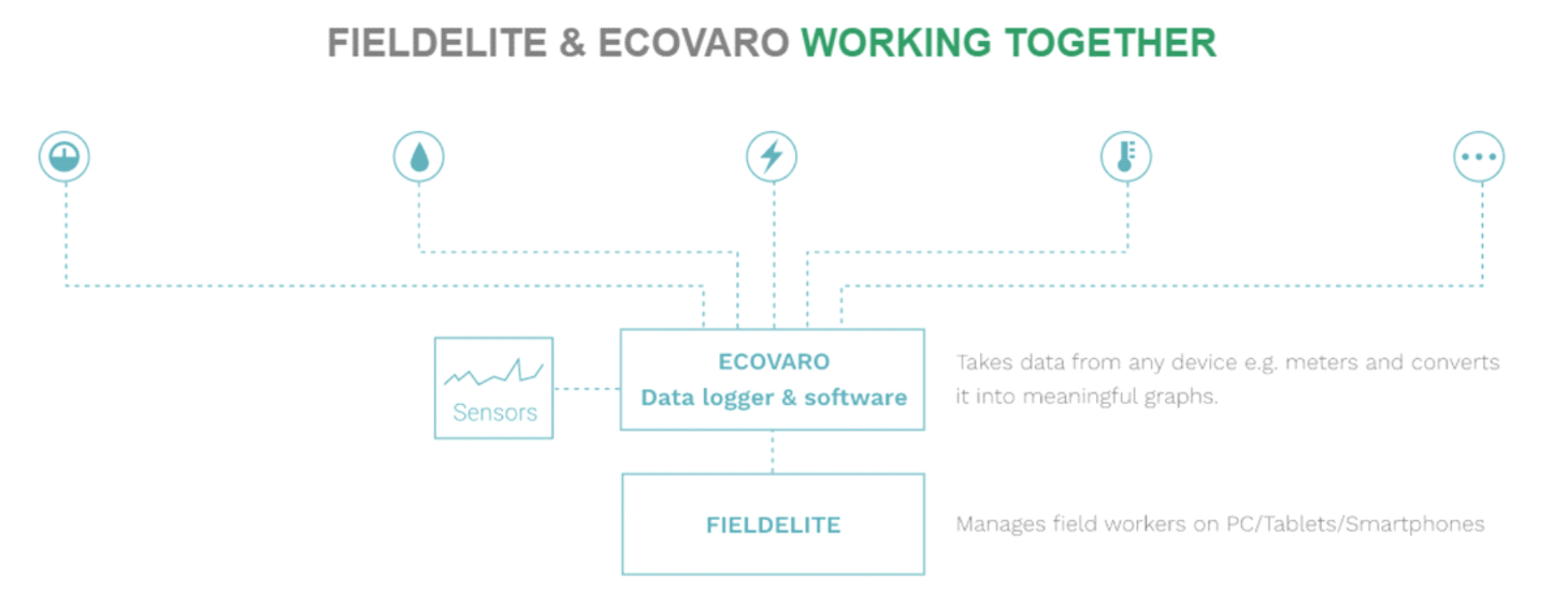
FieldElite and Ecovaro Working Together

This way, you get to optimise your operations and cut down on coasts ? taking advantage of the data analytics tools brought to you by ecoVaro, and streamlining your workflow through FieldElite. IoT powered workforce and energy management systems thus become key in reducing operational expenses, scheduling repairs and maintenance, and planning for peak hours

Accessing real-time data has the welcome benefit of cutting down on the hours spent on energy management processes. Jobs like meter reading that would have taken lots of time are handled by the system. When it comes to field management, operational efficiency is increased by taking away the manual processes involved with all the paperwork.? The sensors monitored via ecoVaro alert the field service manager about equipment that needs to be checked, and FieldElite shows the field manager issues that are on queue to be resolved. In both cases, you get accurate data that will inform the decisions made ? from the maintenance measures required, to scheduling the jobs for the technicians to handle them. It’s a win-win situation.?

Building Blocks For A Brighter Tomorrow

What’s more, this sets you up for the future. Adopting IoT solutions for your field and energy management operations will score you higher ROIs going forward. The global community is working towards enhancing the efficiency of its operations and putting in place sustainable practices in line with their Social Corporate Responsibility (CSR). This is from service providers like plumbing and electrical repair businesses, to utility firms and power generation plants. Lighting systems, homes, office buildings, factories, communities, transportation and whole cites are getting connected through the internet and more control done via smart devices. This is further accelerated by cloud systems enabling real-time, reliable and secure access to the information. By incorporating these setups into your business structure, you will gain a competitive advantage in your niche. After all, we’re still in the early stages of IoT across the industries.

Check our similar posts

What is work force management?

For organisations to ensure they provide the right service.  In order to do they need to assign the right employees with the right skills to the right job at the right time to meet demand.

Workforce Management Background

Workforce management (WFM) is a strategy used by companies to increase their efficiency and performance. It entails all activities aimed at maintaining a steady output, such as human resource management, forecasting, field service management, budgeting, scheduling, performance and training management, analytics, recruitment and data collection.

Workforce management utilizes a unique set of performance enhancing tools and software to bolster corporate management, workers, and other categories of managers and supervisors in the manufacturing team, distribution, transportation, and retail operators. This is sometimes called HRM systems, or part of ERP systems, or workforce asset management.

Unlike the conventional outlay that only needed staff scheduling to improve time management, workforce management is now all-inclusive and demand-oriented to optimize staff scheduling. Apart from focusing on demand-orientation and optimization, workforce management also incorporates:

  • Estimating the workload and resource utilisation
  • Job scheduling
  • Management of working times and accounts
  • Monitoring the process of workforce management

Each task should be clearly defined and performed efficiently based on set engineering standards and methods of optimizing each task as much as possible. Out of this framework and demand based forecasts, workers are scheduled and given tasks, performance measured, give feedback, and incentives computed and paid.

Workforce management is an entire scheme aimed at building the capacity of workers, increase productivity and client relations, and where possible reduce labour costs.

What is Mobile Workforce Management (MWM)

Mobile workforce management (MWM) is a software-based service used to oversee employees outside of the institution?s premises; MWM sometimes refers to the field teams. Mobile workforce management encompasses all activities done to monitor and schedule the field workforce.

The entire process includes procurement, management and using mobile devices, applications and computer software. Related support services like tracking, logging, dispatch, productivity management, and other types of communication are also to make it efficient.

Companies do not have the same needs and MWM firms need to fine-tune their software and devices to sufficiently bridge this gap. Some providers are suited only to a specific type of company because of specialization, like managing the electric grid. This experience makes the MWM company suited to provide applications that are relevant to the company for them to continue operating smoothly and efficiently.

With the increase in mobile devices, applications, secured wireless networks and virtual desktop, there comes a stream of opportunities for small and medium-sized businesses (SMB) and other ventures. Nevertheless, a mobile workforce needs better controls, security and support, as well as a functioning mobile workforce management strategy.

MMS (managed mobility services) is often used interchangeably with MWM, but they should not be confused. MWM is related to software and applications used by mobile and computer devices to manage on-field work while MMS focuses on enterprises, and is like a way of keeping in touch with the company, other employees, and linking the mobile while at work to servers and the database.

Benefits of Mobile Workforce Management

MWM allows the utilization of technology to drive productivity. Here are the top five advantages of MWM..

  1. Customer focused. The customer is the backbone of any business. The team needs to keep in touch with up-to-date information about every interaction. In the end, better client relation makes sure that the customer is always happy.
  2. Information has the power to build or destroy. A cloud-based system is easier to manage and can help with collection of data which is used to make business decisions. This can help cut costs, increase the workforce support, and identify areas where polishing needs to be done.
  3. Improved efficiency. Mobile workforce management is majorly used in taskforce allocation. If the company adopts a cloud-based work force management system, allocation is done automatically saving a lot of time.
  4. Increased revenue. Each business seeks to maximize the profit. With cloud-based mobile workforce management some operations like task management, data analysis, customer communication, reporting, and performance monitoring can be automated. This reduces the costs incurred for multiple applications and saves time.
  5. Ease of communication. Communication is vital. Constant communication with customers drives sales rates and everyone loves that. Quick communication will help customers solve their problems faster and get instant feedback.

Additional WFM benefits

 Other WFM benefits are:

  • Operations are made efficient as all complex processes are automated.
  • Employers learn more about worker engagement, productivity and attendance, allowing them to modify training, coaching and processes aimed at streamlining performance.
  • Automation and easy manipulation of data to improve HR, productivity and slash administrative costs.
  • It increases employee productivity by reducing absenteeism and late arrivals.
  • Boosts the morale of employees by encouraging transparency and facilitating manager-employee communication.
  • WFM analyzes market and schedule requirements to pick the right employee with the best set of skills for a certain task.

Companies which embrace workforce management and mobile workforce management have a higher operational efficiency. They have lower operational costs and limit manual work as much as possible

Field service and customer transparency

These days, a business is as good as it is transparent. Businesses are on unsteady ground because of the ever changing face of social media and a never-seen-before demand for information. With many sources of info on the internet, being credible is a sure way of building trust and loyalty among clients.

Here is an example. Customers will always believe what they see. If they see the work you put into furnishing their favourite products, you have a greater chance of getting their approval. They can invest more in what they see. The clothing merchandise Patagonia did this for their Footprint Chronicles line to show how their jackets are made and worked out fine for them.
Transparency is a must. Nowadays, customers never forget when they feel cheated. It is even harder to ensure transparency because many clients are also experts who scrutinise every detail. So, how can you keep transparency at the forefront?

Have transparent workforce management

Customers always look for new information and want to be in the know. There is nothing worse than not being able find a product manual or an easy way to set up appointments. By giving your clients a self-service option, they can pick the services they want. This leaves more time to get stuff done rather than answering unending service calls from dissatisfied customers.

For instance, you could have a field service customer self-service application that allows customers to look for personalised services, a machine manual, book appointments, or solve any other problem. Customers then get feedback anytime. This one-on-one approach can help customers feel like their questions are being answered. They?ll also not go through the hassle of long hold times to reach an available customer service representative.

Create transparency in field service repair projects

If field technicians have access to field service software, it allows technicians to be more open to customers. This gives them vital information like customer history and the ERP, so that they can explain changes that were made after past enquiries and what is being done in current products. Such information can be a guide for future updates or let the techs suggest products that suit a client’s taste. Unlike always staying offline and out of touch with your client, using field service software can allow entry of allowances and mileage, and also let the customer know the delivery time for their products.

Show customers what they’re paying for

With field service automation, billing will also be transparent. By using the available information about your field service solution, the station can send updated service reports to the customer like mileage, allowances, parts, hours worked, and photos of broken parts from the service. After the customer authenticates the transaction with a signature, the field service agent can generate and sent to the customer an invoice based on the agreed upon services. In case allowances and mileage can be forwarded to the customer, it will be shown on the invoice.
Because you use field service automation, it means that the customer will receive the invoice really fast ? in days rather than weeks ? and transparency will skyrocket because the whole experience of the service will leave a permanent mark in their mind.

Mistaking information for transparency

Being honest with your customer is the one thing. Wasting their time with unnecessary information is another. Here is an experience I had with a small retailer. Tracking information is only useful if it has recent updates and is accurate. If the company want to use real time tracking, let them do so under one condition ? updates should be regular and on time so as not to leave the customer frustrated because they also make plans based on the same information. Late updates shed light on the nature of the service command. Everyone hates cooked-up real time information.

A company must not always have a one to one exchange of information with customers to maintain transparency..

  • Use simple language that all customers can understand
  • Don’t use abbreviations that only employees know
  • Never ever air your failures and flaws to your customers

It is interesting that most of the tools we use to keep in touch with our clients and servicing their requests can also be used to gather data and iron out possible errors to improve products and services. This is a good chance for service providers to evaluate and make necessary amendments.

There are some areas that will need improving while others will not, nevertheless, the client needs to always be informed and know why things are the way they are. Not all details should be told, so filter what you share.

5 ways field service supports customer service

Sales organisations are always in motion, working to deliver the right product to their customers. To keep customers smiling all times is hard and only needs close communication and fulfilling promises that were made to them. This is where the field service delivery team comes in. Field service can either meet this demand or fall short plummeting satisfaction rates.
This is a task that relies on right people using various parts and information to get the job done. No matter what, the customer always expects to get exceptional services whether it be over the phone, chats, in the field, online messaging, over email, or social media.

These five field service points are suitable for any business model and guarantee excellent company-client relations.

Proactive service

A proactive service gives more to the customer. More attention is given to the customer so that the right actions, deliveries and repairs are done. By getting everything right the first time, the customer has less to do ensuring that they are satisfied with the services.
However, the field service technician is flooded with a myriad of unpredictable situations; overheating equipment, stalled machines, and insufficient precaution. But through field management software, they get more data about the customer and type of service or parts expected and they easily ride through any storm and prevent future damage.

Transparency

Nothing frustrates a customer more than a schedule that delays repairs. They easily ditch you for better services elsewhere. By offering the customer a service where they book appointments based on their own availability, we can easily sync this to the technicians and manager?s calendar. This not only saves time but also money from otherwise idle equipment.

On-site and off-site collaboration

Having seamless communication between field and office technicians is vital. Field technicians need to know more about parts, repairs, client maintenance history, and predict what should be changed in the long run. The faster they do this the better.

There should be a system that creates and automates communication between field and office technicians. Let each have the upper hand when providing parts, products or services to the customer.

Flexibility

Information is key to field service agents. They make the first impression since they make the initial contact with clients. Regardless of the resources, the field technician must always be armed with mobile tools they will need to access online resources and be ready for any emergency.

Actionable performance improvements

Customers demand excellent service a company could offer. But as the game constantly shifts, the service management technicians must also come up with plans to stay up to par with competition. All these stems from coming up with KPIs, measuring them and turning them into a workable plan for the future.

Top 10 Disadvantages of Spreadsheets

Fraudulent manipulations in company Excel files have already resulted in Billion-Dollar losses. The main underlying reason behind this spreadsheet vulnerability is the inherent lack of controls, which makes it so easy to alter either formulas, values, or dependencies without being detected.


Disadvantages of Spreadsheets - Kindle

Disadvantages of Spreadsheets

Comprehensive information and data your organisation needs, to circumvent the threats posed by spreadsheets.


Buy Now

1. Vulnerable to Fraud

Of all the spreadsheet disadvantages listed here, this is perhaps the most damaging. Fraudulent manipulations in company Excel files have already resulted in Billion-Dollar losses. The main underlying reason behind this spreadsheet vulnerability is the inherent lack of controls, which makes it so easy to alter either formulas, values, or dependencies without being detected.

2. Susceptible to trivial human errors

While fraud will always be a threat to spreadsheet systems, there is a more significant threat that should make you seriously consider getting rid of these outdated systems. And that is its extreme susceptibility to even trivial human errors. Missed negative signs and misaligned rows may sound harmless.

But when they damage investor confidence or cause a considerable loss of opportunity amounting to millions of dollars (Are we serious? Google up ?spreadsheet horror stories? to find out), you should understand that it?s time to move on to better alternatives.

3. Difficult to troubleshoot or test

So how about testing spreadsheets to mitigate the risks of items 1 and 2? Good luck. Spreadsheets just aren?t built for that. It?s not uncommon to have interrelated spreadsheet data scattered across different folders, workstations, offices, or even geographical locations.

Worse, even if you are able pinpoint the locations of every related file, tracing the logic of formulas from one related cell to another can take ages. It?s pretty obvious now how you?ll also encounter a similar problem when troubleshooting questionable data.

4. Obstructive to regulatory compliance

Combine items 1, 2, and 3, and what do you get? A big headache impacting regulatory compliance. There are number of regulations that have a serious impact on the use of spreadsheets.

Some of the many regulations that impact spreadsheet systems include:

And to think it looks like regulatory bodies are just getting warmed up. Over the last two decades, we’ve seen a surge in regulations that directly affect spreadsheet-based systems. Now, you tell me that you haven?t wished there was a better way to beat regulatory compliance deadlines. Well, if you?re still using spreadsheets, then there certainly is a better way.

5. Unfit for agile business practices

We’re now in an age when major changes are shaping and reshaping the business landscape. Mergers and Acquisitions, Management Buyouts, earthquakes, tsunamis, hurricanes, uprisings, climate change, new technologies, and so on. If your business is not agile enough to adapt to such changes, it could easily be left behind or even face extinction.

Spreadsheets are normally created by individuals who have not the slightest know-how regarding software documentation. In the end, spreadsheet files become highly personalised user developed applications. So when it?s time for a new person to take over as part of a large scale business change, the newcomer may have to start from scratch.

Read further about Implementing Large-Scale Business Change


6. Not designed for collaborative work

Planning, forecasting, budgeting, and reporting are all collaborative activities. In other words, plans, forecasts, budgets, and reports typically require information from different individuals belonging to different departments. In addition, the final documents are a result of multiple exchanges of data, ideas, and files.

Now, if your company?s offices are scattered throughout the country or if certain team members are separated by large distances, the only way to exchange data stored in spreadsheets is through email.

Experience will tell you that such a method of exchange is susceptible to duplicate and even erroneous data. Team members will tend to find it hard to keep track of similar files going back and forth, and sometimes even end up sending the wrong version.

7. Hard to consolidate

When it comes to simple data entry and quick ad hoc data analysis tasks, spreadsheets are highly favoured by end users. This has made them one of the most ubiquitous office tools on the planet. But as a consequence, data in spreadsheet-based systems are distributed throughout the organisation.

So when it’s time to generate reports, you’ll really have to go through a slow consolidation process. In most cases, end users would have to collect data from different files, summarise them, and submit the same to their department heads through emails, portable storage media (e.g. CDs or USB flash-drives), or by copying to a commonly shared network folder.

Department heads would have to undergo a similar process before submitting them to their own superiors. This has to go on until all the information reaches their organisation’s top decision makers. Throughout the entire consolidation process, data is subjected to numerous error-prone activities such as copy-pasting, cell entry, and range specification.

8. Incapable of supporting quick decision making

In a spreadsheet-based environment, extracting data from different departments, consolidating them, and summarising the information so that it could aid the company’s top brass in making sound decisions can be very time consuming.

And because we know how susceptible spreadsheets are to errors, everyone involved in the information processing has to be ultra careful to keep the integrity of the data intact. Hence it would be prudent to enforce double-checking as much as possible.

This extra but necessary exercise can further delay the process. So, when the final information arrives at the hands of the top executive, he may not have much time to work with. (Read about Business Intelligence)

9. Unsuited for business continuity

As mentioned earlier, data in spreadsheet systems are never kept in a single place. In fact, it’s the exact opposite. The worse thing about it is that they’re always in the hands of non-IT personnel, who are understandably not familiar with storage and backup best practices.

Thus, if a major disaster strikes, full data recovery can be very difficult if not impossible. As a consequence, even if the company has financial reserves, the absence of data (e.g. accounts receivable records, customer records, and inventory) to work on can prevent the company from making a quick restart.

10. Scales poorly

As an organisation grows, data in spreadsheet-based systems get more distributed; subsequently compounding the issues outlined above. It is absolutely not advisable for a large organisation to keep using spreadsheets.


More Spreadsheet Blogs

Spreadsheet Risks in Banks

Top 10 Disadvantages of Spreadsheets

Disadvantages of Spreadsheets – obstacles to compliance in the Healthcare Industry

How Internal Auditors can win the War against Spreadsheet Fraud

Spreadsheet Reporting – No Room in your company in an age of Business Intelligence

Still looking for a Way to Consolidate Excel Spreadsheets?

Disadvantages of Spreadsheets

Spreadsheet woes – ill equipped for an Agile Business Environment

Spreadsheet Fraud

Spreadsheet Woes – Limited features for easy adoption of a control framework

Spreadsheet woes – Burden in SOX Compliance and other Regulations

Spreadsheet Risk Issues

Server Application Solutions – Don’t let Spreadsheets hold your Business back

Why Spreadsheets can send the pillars of Solvency II crashing down


Advert-Book-UK

amazon.co.uk


Advert-Book-USA

amazon.com


Contact Us

  • (+353)(0)1-443-3807 – IRL
  • (+44)(0)20-7193-9751 – UK

Ready to work with Denizon?