
How DevOps oils the Value Chain

DevOps ? a clipped compound of development and operations – is a way of working whereby software developers are in a team with project beneficiaries. A client centred approach extends the project plan to include the life cycle of the product or service, for which the software is developed.

We can then no longer speak of a software project for say Joe?s Accounting App. The software has no intrinsic value of its own. It follows that the software engineers are building an accounting app product. This is a small, crucially important distinction, because they are no longer in a silo with different business interests.

To take the analogy further, the developers are no longer contractors possibly trying to stretch out the process. They are members of Joe?s accounting company, and they are just as keen to get to market fast as Joe is to start earning income. DevOps uses this synergy to achieve the overarching business goal.

A Brief Introduction to OpsDev

You can skip this section if you already read this article. If not then you need to know that DevOps is a culture, not a working method. The three ?members? are the software developers, the beneficiaries, and a quality control mechanism. The developers break their task into smaller chunks instead of releasing the code to quality control as a single batch. As a result, the review process happens contiguously along these simplified lines.

Code QC Test ? ? ?
? Code QC Test ? ?
? ? Code QC Test ?
? ? ? Code QC Test
Colour Key Developers Quality Control Beneficiary

This is a marked improvement over the previously cumbersome method below.

Write the Code ? Test the Code ? Use the Code
? Evaluate, Schedule for Next Review ?

Working quickly and releasing smaller amounts of code means the OpsDev team learns quickly from mistakes, and should come to product release ahead of any competitor using the older, more linear method. The shared method of working releases huge resources in terms of user experience and in-line QC practices. Instead of being in a silo working on its own, development finds it has a richer brief and more support from being ?on the same side of the organisation?.
The Key Role that Application Program Interfaces Play

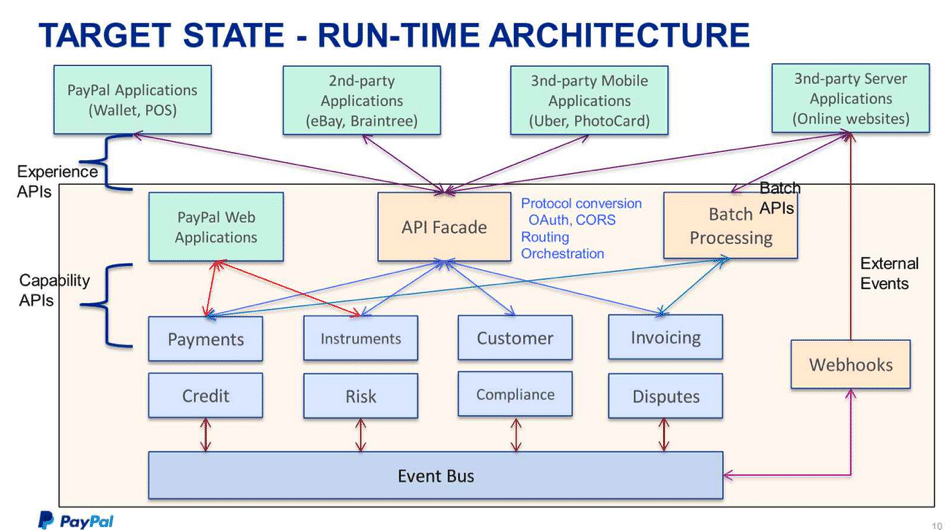
Application Program Interfaces, or API?s for short, are building blocks for software applications. Using proprietary software-bridges speeds this process up. A good example would be the PayPal applications that we find on so many websites today. API?s are not just for commercial sites, and they can reduce costs and improve efficiency considerably.

The following diagram courtesy of TIBCO illustrates how second-party applications integrate with PayPal architecture via an API fa?ade.

Working quickly and releasing smaller amounts of code means the OpsDev team learns quickly from mistakes, and should come to product release ahead of any competitor using the older, more linear method. The shared method of working releases huge resources in terms of user experience and in-line QC practices. Instead of being in a silo working on its own, development finds it has a richer brief and more support from being ?on the same side of the organisation?.

imgd2.jpg

The DevOps Revolution Continues ?

We close with some important insights from an interview with Jim Stoneham. He was general manager of the Yahoo Communities business unit, at the time Flickr became a part. ?Flickr was a codebase,? Jim recalls, ?that evolved to operate at high scale over 7 years – and continuing to scale while adding and refining features was no small challenge. During this transition, it was a huge advantage that there was such an integrated dev and ops team?

The ?maturity model? as engineers refer to DevOps status currently, enables developers to learn faster, and deploy upgrades ahead of their competitors. This means the client reaches and exceeds break-even sooner. DevOps lubricates the value chain so companies add value to a product faster. One reason it worked so well with Flickr, was the immense trust between Dev and Ops, and that is a lesson we should learn.

?We transformed from a team of employees to a team of owners. When you move at that speed, and are looking at the numbers and the results daily, your investment level radically changes. This just can’t happen in teams that release quarterly, and it’s difficult even with monthly cycles.? (Jim Stoneham)

Contact Us

  • (+353)(0)1-443-3807 – IRL
  • (+44)(0)20-7193-9751 – UK

Check our similar posts

Mobile Workforce Management in a nutshell

It is fairly common for businesses to have staff working across many different locations across the country or even the world.  Engaged in various activities like  door-to-door sales, delivery and installations, service maintenance, conducting inspections & investigations or even data collection.

Managing and co-ordinating tasks, scheduling activities, planning and monitoring activities and communicating can often be challenging.

Mobile Workforce Management is the automation of the entire end-to-end workflow management and operations of any field service workers. 

Mobile Workforce Management Synonyms

Mobile Workforce Management is also known as

  • Field Service Management
  • Job Scheduling Software
  • Job Management Software

Advantages of Mobile Workforce Management

It is increasingly clear that there needs to be a certain sense of discipline and streamlining of field operations and important to automate certain tasks within field sales and operations, primarily because it helps you to track your assets remotely and ensuring contact with your workforce when required. Enabling your team to get in touch when required.

Most importantly, engineers, sales representatives and customer care executives can easily send information, scan receipts, Invoice customers and retrieve other crucial information in a standardized and streamlined manner. Assisting in regulating your business and also bringing some order to what is usually a very chaotic mode of working.

Why choose Mobile Workforce Management

Work Force Management tools help you to stay in control. They assist in automating what can and should be automated leaving only the crucial human-human interactivity. Helping you to keep a record of all interactions and important data within a database, without you having to manually go through sales receipts, complaint slips and other such details.

A Field Force Management tool is a time-saver and efficiency tool for companies. Moreover, these tools help to automate several aspects of your day to day operations, leading to an increase in productivity and motivation.

Streamlining operations, will also ensure that important stakeholders are well informed and management visibility is enhanced. Helping your business to make smarter decisions and help serve your customers better.

Field Force Management is similar to an Enterprise Resource Planning (ERP) solution but is vastly different. It is specifically targeted at staff that work on the field and is intended to make their and your work more streamlined, transparent and easy to track.

Cloud based solutions help you automate

 Field Force Management is usually cloud based which means all data is stored and accessible on secure cloud servers. There is no question of losing important data or not being able to retrieve something important. If something goes missing, there will usually be a backup available. Field force management tools include the software, the hardware and also the kind of training that is required for users to use it efficiently.

The software usually helps in saving and processing information while the hardware helps employees to enter important data into devices while they are on the job. Sometimes, field force solutions can also be a mobile app which negates the need for a specific or special device.

This is very important when it comes to field jobs as carrying different devices can prove to be a cumbersome job. At the end of the day, field force solutions are meant to reduce the burden on staff and not actually inadvertently increase it.

Denizon?s FieldElite Mobile Workforce management application provides significant improvements in efficiency and service with a switch to digital working and the elimination of paperwork.

All the information that is stored on the cloud can be run through analytics software so that you get the kind of reports that you are looking for to improve your business.

Field Force Management Process

A field force management tool helps you to remain in contact with your staff while they are at work on the field. This helps you to track your personnel in real time. Field personnel or your staff can log in and enter their attendance using a smartphone. You can assign that particular day?s task remotely using a web console or your own smartphone.

Next, they can carry out whatever duties they need to while you get all the alerts that you set to receive. This helps to increase transparency. You can choose to receive alerts on your phone or on your desktop.

Finally, staff can tag completed tasks with audio and images, instead of they having to type reports. This helps to focus more on the job than on job reporting. Last but not the least, location tags help you to ensure that the job is done at the right place. Your staff will not be able to take your generosity for granted.

All in all, a field force management tool helps you to track and control your staff without you having to be physically present with them and this is the beauty of this tool.

Summary

Field Force Management helps companies to reduce administration expense and improve productivity. This helps to automate data integration which is usually done with the help of cloud servers. Moreover, you can set invoice parameters that help you to also keep track of stocks, inventories and engage in P.O. and task management.

A number of field force management users also use it as a tool to engage in credit management. Banks and insurance companies particularly find this tool helpful as payments can be received on the job, instead of asking customers to pay online or offline. This also helps in building valuable customer relationships and enhance loyalty.

Thirdly, a field force management tool helps to increase planning efficiency. This means, you will be able to allocate tasks and optimize routing. All this helps to increase your ROI at the end of the day and get back the money you invest on field force management.

Finally, you will have more control over productivity and sales thanks to automation of data collection. You will also have more control over the execution of tasks and that will invariably make your company leaner and smarter.

Competencies, Roles and Responsibilities of Lead Assessors

Any organisation that opts for energy audits, Display of Energy Certificates and Green Deal Assessments needs a lead assessor to review the chosen ESOS compliance routes. The Derivative provides that energy audits should be carried out independently by qualified and accredited experts. Additionally, these audits should be implemented as well as supervised by independent authorities under the national legislation.

Lead assessors undertake several roles in ESOS assessments. He or she is the one responsible to take the lead of the entire assessment team, prepare the plan, conduct the meetings and submit the formal report to governing authorities. Nevertheless, selecting an appropriate lead assessor is an important element that every organisation should carefully consider.

Competencies Requirements of Lead Assessors

Lead assessors should be knowledgeable enough with in-depth expertise in carrying out energy efficiency assessment. They should also possess foundational, functional and technical competencies to deliver the task effectively. Likewise, consider the assessors? sector experiences, familiarity with your business? technologies and properties, and accreditation with prescribed standards.

As you choose your lead assessor, contemplate on the skills and qualifications that would give your organisation benefits.

Roles and Responsibilities of Lead Assessors

The business organisation is responsible for the overall legal ESOS compliance. Moreover, here are some of the roles and responsibilities that lead assessors should assume in ESOS assessments.

The lead assessor agrees on the audit methodologies that the organisation would undergo in new audits. He or she agrees with the ESOS participant regarding the audit timetable, sampling approach and visits required. It is also the lead assessor?s role to identify the opportunities on energy saving and assist in calculating the cost savings from the measures taken. During the ESOS audits, the lead assessor determines the energy use profiles, presents the recommendations and reviews the entire assessment as a whole. Furthermore, he or she should maintain the evidence pack of the ESOS to uphold the audit’s credibility, its findings and recommendations.

Finding Lead Assessors

Energy and environment professionals would only be able to demonstrate their expertise as lead assessors upon registering in a professional body accredited by the Environment Agency. Any business that needs a lead assessor is advised to check on the EA?s website to see the details of approved registers.

Lead assessors can either be in-house experts or external professionals. However, they should be able to provide proof of membership as an approved register to take the role of a lead assessor. If the organisation has an internal lead assessor, the company should then take the final ESOS assessment to two board-level directors that would sign the formal report.

Indeed, the lead assessor is an organisation’s partner when it comes to delivering great results. With good professional conduct and excellent management of an assessment team, the lead assessor can help achieve breakthrough energy efficiency strategies. More than anything else, the organisation will benefit from maximum energy savings opportunities ahead. Thus, every qualified business enterprise should invest in finding the best lead assessor to guide them towards success.

Contact Us

  • (+353)(0)1-443-3807 – IRL
  • (+44)(0)20-7193-9751 – UK
Disadvantages of Spreadsheets – Obstacles to Compliance in the Healthcare Industry

Most of the regulatory compliance issues we talked about concerning spreadsheets have been related to financial data. But there are other kinds of data that are stored in spreadsheets which may also cause regulatory problems in the future.

In the US, a legislation known as HIPAA or Health Insurance Portability and Accountability Act is changing the way health care establishments and practitioners handle patient records. The HIPAA Privacy Rule is aimed at protecting the privacy of individually identifiable health information a.k.a. protected health information (PHI).

Examples of PHI include common identifiers like a patient’s name, address, Social Security Number, and so on, which can be used to identify the patient. HIPAA covers a wide range of health care organisations and service providers, including: health plan payers, health care clearing houses, hospitals, doctors, dentists, etc.

To protect the confidentiality, integrity, and availability of PHI, covered entities are required to implement technical policies such as access controls, authentication, and audit controls. These can easily be implemented on server-based systems.

Sad to say, many health care organisations who have started storing data electronically still rely on spreadsheet-based systems. Those policies are hard to implement in spreadsheet-based systems, where files are handled by end-users who are overloaded with their main line of work (i.e. health care) and have very little concern for data security.

In some of these systems, spreadsheet files containing PHI may have multiple versions in different workstations. Chances are, none of these files have any access control or user authentication mechanism whatsoever. Thus, changes can easily be made without proper documentation as to who carried out the changes.

And because the files are normally easily accessible, unauthorised disclosures – whether done intentionally or accidentally – will always be a lingering threat. Remember that HIPAA covered entities who are caught disclosing PHI can be fined from $50,000 up to $500,000 plus jail time.

But that’s not all. Through the HITECH Act of 2009, business associates of covered entities will now have to comply with HIPAA standards as well. Business associates are those companies who are performing functions and services for covered entities.

Examples of business associates are accounting firms, law firms, consultants, and so on. They automatically need to comply with the standards the moment they too deal with PHI.


More Spreadsheet Blogs


Spreadsheet Risks in Banks


Top 10 Disadvantages of Spreadsheets


Disadvantages of Spreadsheets – obstacles to compliance in the Healthcare Industry


How Internal Auditors can win the War against Spreadsheet Fraud


Spreadsheet Reporting – No Room in your company in an age of Business Intelligence


Still looking for a Way to Consolidate Excel Spreadsheets?


Disadvantages of Spreadsheets


Spreadsheet woes – ill equipped for an Agile Business Environment


Spreadsheet Fraud


Spreadsheet Woes – Limited features for easy adoption of a control framework


Spreadsheet woes – Burden in SOX Compliance and other Regulations


Spreadsheet Risk Issues


Server Application Solutions – Don’t let Spreadsheets hold your Business back


Why Spreadsheets can send the pillars of Solvency II crashing down

?

Advert-Book-UK

amazon.co.uk

?

Advert-Book-USA

amazon.com


Ready to work with Denizon?