
What Is Technical Debt? A Complete Guide

You buy the latest iPhone on credit. Turn to fast car loan services to get yourself those wheels you’ve been eyeing for a while. Take out a mortgage to realise your dream of being a homeowner. Regardless of the motive, the common denominator is going into financial debt to achieve something today, and pay it off in future, with interest. The final cost will be higher than the loan value that you took out in the first place. However, debt is not limited to the financial world.

Technical Debt Definition

Technical debt – which is also referred to as code debt, design debt or tech debt – is the result of the development team taking shortcuts in the code to release a product today, which will need to be fixed later on. The quality of the code takes a backseat to issues like market forces, such as when there’s pressure to get a product out there to beat a deadline, front-run the competition, or even calm jittery consumers. Creating perfect code would take time, so the team opts for a compromised version, which they will come back later to resolve. It’s basically using a speedy temporary fix instead of waiting for a more comprehensive solution whose development would be slower.

How rampant is it? 25% of the development time in large software organisations is actually spent dealing with tech debt, according to a multiple case study of 15 organizations. “Large” here means organizations with over 250 employees. It is estimated that global technical debt will cost companies $4 trillion by 2024.

Is there interest on technical debt?

When you take out a mortgage or service a car loan, the longer that it takes to clear it the higher the interest will be. A similar case applies to technical debt. In the rush to release the software, it comes with problems like bugs in the code, incompatibility with some applications that would need it, absent documentation, and other issues that pop up over time. This will affect the usability of the product, slow down operations – and even grind systems to a halt, costing your business. Here’s the catch: just like the financial loan, the longer that one takes before resolving the issues with rushed software, the greater the problems will pile up, and more it will take to rectify and implement changes. This additional rework that will be required in future is the interest on the technical debt.

Reasons For Getting Into Technical Debt

In the financial world, there are good and bad reasons for getting into debt. Taking a loan to boost your business cashflow or buy that piece of land where you will build your home – these are understandable. Buying an expensive umbrella on credit because ‘it will go with your outfit‘ won’t win you an award for prudent financial management. This also applies to technical debt.

There are situations where product delivery takes precedence over having completely clean code, such as for start-ups that need their operations to keep running for the brand to remain relevant, a fintech app that consumers rely on daily, or situations where user feedback is needed for modifications to be made to the software early. On the other hand, incurring technical debt because the design team chooses to focus on other products that are more interesting, thus neglecting the software and only releasing a “just-usable” version will be a bad reason.

Some of the common reasons for technical debt include:

  • Inadequate project definition at the start – Where failing to accurately define product requirements up-front leads to software development that will need to be reworked later
  • Business pressure – Here the business is under pressure to release a product, such as an app or upgrade quickly before the required changes to the code are completed.
  • Lacking a test suite – Without the environment to exhaustively check for bugs and apply fixes before the public release of a product, more resources will be required later to resolve them as they arise.
  • Poor collaboration – From inadequate communication amongst the different product development teams and across the business hierarchy, to junior developers not being mentored properly, these will contribute to technical debt with the products that are released.
  • Lack of documentation – Have you launched code without its supporting documentation? This is a debt that will need to be fulfilled.
  • Parallel development – This is seen when working on different sections of a product in isolation which will, later on, need to be merged into a single source. The greater the extent of modification on an individual branch – especially when it affects its compatibility with the rest of the code, the higher the technical debt.
  • Skipping industrial standards – If you fail to adhere to industry-standard features and technologies when developing the product, there will be technical debt because you will eventually need to rework the product to align with them for it to continue being relevant.
  • Last-minute product changes – Incorporating changes that hadn’t been planned for just before its release will affect the future development of the product due to the checks, documentation and modifications that will be required later on

Types of Technical Debt

There are various types of technical debt, and this will largely depend on how you look at it.

  • Intentional technical debt – which is the debt that is consciously taken on as a strategy in the business operations.
  • Unintentional technical debt – where the debt is non-strategic, usually the consequences of a poor job being done.

This is further expounded in the Technical Debt Quadrant” put forth by Martin Fowler, which attempts to categorise it based on the context and intent:
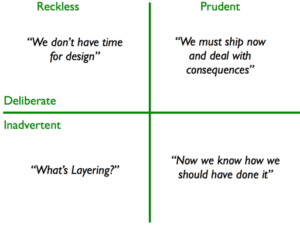
Technical Debt Quadrant

Source: MartinFowler.com

Final thoughts

Technical debt is common, and not inherently bad. Just like financial debt, it will depend on the purpose that it has been taken up, and plans to clear it. Start-ups battling with pressure to launch their products and get ahead, software companies that have cut-throat competition to deliver fast – development teams usually find themselves having to take on technical debt instead of waiting to launch the products later. In fact, nearly all of the software products in use today have some sort of technical debt.

But no one likes being in debt. Actually, technical staff often find themselves clashing with business executives as they try to emphasise the implications involved when pushing for product launch before the code is completely ready. From a business perspective, it’s all about weighing the trade-offs, when factoring in aspects such as the aspects market situation, competition and consumer needs. So, is technical debt good or bad? It will depend on the context. Look at it this way: just like financial debt, it is not a problem as long as it is manageable. When you exceed your limits and allow the debt to spiral out of control, it can grind your operations to a halt, with the ripple effects cascading through your business.


Check our similar posts

IT Systems Implementation

Are you ready to find out how your newly accepted IT system fares in the real world? Although a rigorous Acceptance testing process can spot a wide spectrum of flaws in a newly constructed IT system, there is no way it can identify all possible defects. The moment the IT system is delivered into the hands of actual end users and other stakeholders, it is effectively stepping out of a controlled and secure environment.

Thus, it is during this phase wherein issues having direct impact on the business can arise.

It is our duty to ensure that the Systems Implementation phase is carried out as thoroughly, professionally, and efficiently as possible.

Thoroughly, because we need to include all relevant data and other deliverables, eliminate hard-to-detect miscalculated results, and substantially reduce the probability of business and mission critical issues popping up in the future;

Professionally, because it is the best way to address the sensitive process of turning over a new system to users who have gotten used to the old one;

And efficiently, because we want to minimise the duration over which all stakeholders have to adapt to the new system and allow them to move on to the process of growing the business.

Preparation

Louis Pasteur once said, “Luck favours the mind that is prepared.”

While we certainly won’t leave anything to chance, we do put substantial weight on the Preparation stage of Systems Implementation. We’re so confident with the strategies we employ in Preparation, that we can assure you of an utterly seamless Deployment and Transition phase.

By this we mean that issues that may arise during Deployment and Transition will be handled smoothly and efficiently because your people will know exactly what to do.

Here’s how we will prepare your organisation for Deployment:

  • Identify all key players for the Systems Implementation phase and orient them on their specific roles. We’ll make sure they know what possible hitches may come their way and how to deal with them.
  • Identify all end users and their corresponding functions, then assign appropriate access rights.
  • Draw multi-layered contingency plans to capture and address each possible concern that may crop up during Deployment.
  • Prepare a systematic step-by-step procedure and checklist for the entire Deployment stage. Both of them should have been copied from a similar procedure and checklist used in the Acceptance testing phase.
  • Make all stakeholders understand the conditions required before Deployment can commence.
  • Set the appropriate environment so that all stakeholders know what to expect and when to expect them the moment Deployment commences.
  • Prepare Technical Services and Technical Support personnel for the gruelling mission ahead.
  • Make sure all communication processes are well coordinated so that everyone affected will know who to contact and how to get in touch with them when a problem arises.
  • Plan and schedule training sessions so that they can be conducted “just in time”. Training sessions conducted way ahead of Deployment are often useless because the trainees tend to forget about what they learned when the time comes to apply them. Similarly, training sessions conducted way after Deployment also become useless because trainees are seldom able to internalise instructions delivered during crash courses.

Deployment

There are two sets of issues to keep an eye on during Deployment:

  1. Issues directly related to the technology itself, e.g. application functionality and data integrity, and
  2. Issues emanating from the end users, i.e., their unwillingness to use the new system. One reason may be because they find the interface and procedures too confusing. Another would be due to other inconveniences that come with adapting to a new set of procedures.

Despite all the meticulous scrutiny employed during Acceptance testing, there are just some problems that are made obvious only during Deployment. Issues belonging to the first set are dealt with easily because of the plans and procedures we put in place during the Preparation stage. As an added measure, our team will be on hand to make sure contingency plans are executed accordingly.

While the second set of issues is often neglected by many IT consultancy companies, we choose to meet it head on.

We fully understand that end users are most sensitive to the major changes that accompany a new system. It is precisely for this reason why our training activities during Deployment are designed not only to educate them but also to make them fully appreciate the necessity of both the new system and the familiarisation phase they will need to go through.

The faster we can bring your end users to accept the new system, the faster they can refocus on your company’s business objectives.

Here’s what we’ll do to guarantee the smoothest Deployment process you’ve ever experienced.

  • Employ the procedure and checklist formulated during the Preparation stage.
  • Ensure all end users are well acquainted with any additional tasks they would need to perform (e.g. filling up manual logs).
  • Assess which legacy systems can still be used alongside the new technology and which ones have to be retired.
  • Supervise the installation and optimal configuration of all supporting hardware and software to make sure the likelihood of errors originating from them are brought to near-zero levels.
  • Supervise the installation and optimal configuration of the products themselves.
  • Carry out data migration tasks if necessary.
  • Organise and oversee parallel runs to check for data and report inconsistencies.
  • Conduct training sessions in a professional and well-timed manner to eliminate end-users’ feelings of agitation and to take advantage of memory absorption and retention duration as with regards to their assigned duties and responsibilities.

Transition

Do you often feel uneasy whenever the reins to a newly purchased IT system are handed over to you? Perhaps there are some issues that you feel haven’t been fully settled but, at the same time, find it too late to back out, having already invested so much time and resources.

Alright, so maybe the thought of “backing up” never crossed your mind. However, the concern of being “not yet ready” is raised by many organisations towards the tail end of most Deployment stages. This usually drags the Deployment stage into a never-ending process.

Our team of highly experienced specialists will make sure you reach this point with utmost confidence to proceed on your own.

To wrap up our comprehensive IT Systems Implementation offering, we’ll take charge of the following:

  • Verify that all deliverables, including training materials and other technical documentation, are accomplished and expected outcomes are realised.
  • Make sure all technical documentation are placed in a secure and accessible location.
  • Institute best practices to ensure the IT system becomes fully utilised and to reduce its exposure to avoidable risks.
  • Establish open communication lines with the Technical Support team to enable quick resolution of issues.
  • Ensure complete knowledge transfer has been fully achieved so that your people will spend less time calling Technical Support and more on operations contributory to business growth.
5 Ways To Grow Your Business | How Field Service Management Software Helps

Building up any business is already hard, more so when it involves providing field services.

A field service business owner has to manage the usual tasks, like scheduling jobs efficiently or inventory checks, and you have to do it while your employees are scattered about on various locations.

It’s the reason FieldElite was created, to provide companies with a much better way to manage and monitor their field workers.

Aside from effective management for your workforce on the move, field service management software can also help your business grow.

5 Ways Using Field Service Management Software Grows Your Business

1. Management Integration

You replace manual field service processes. If your business also uses other management apps, like CRM, payroll, industry-specific software, etc., make sure to integrate them with your chosen field service management software.?

Make those software work side-by-side with your field service management app to achieve streamlined business management.

Integration also removes the possibility of duplicate input on the regular system used and your field service management software, maximising your efficiency and business growth.

2. Improved Tracking

Utilising a field service management software gives you better tracking of every aspect of your field service business.

  • Track your inventory numbers in real-time ? know exactly how much stock is on hand for parts, and when it’s time to order more
  • Constant updates on Key Performance Indicators ? ensure your business is running smoothly
  • First-time fix rates tracking ? avoid wrong rate application
  • Monitor your technician?s performance ? ensuring quality work, in turn, profit.

Grow your business by having improved tracking on meaningful data and analytics produced from your field service management software.

3. Cost Cutting

Cutting costs can improve your bottom line and a lot of businesses turn to laying off technicians to cut costs. With a field service management software, there?s no need to go this route.

You cut costs through no manual processes needing to be completed. No need to hire back-office staff to field service calls or produce paperwork orders.

Your field service software should have all your automated needs met for efficient field job management.

An example of cost-cutting using field service app:

Track how much your technicians drive and find alternate routes for them to take.

  • Reduce gas expenses
  • Reduce repair bills for the truck
  • Finding better alternate routes can give more time to get to more jobs
  • Increased efficiency for the field technician

4.? Mobile Adaptability

Field service companies are focusing on mobility to grow their business. With a field service management software, technicians have on hand the tools and information needed to complete their job.

Field technicians can utilise the following field service software features:

  • Limit how much time they spend completing administrative work with the automated work-order management
  • Complete checklists on their mobile device and follow step-by-step instructions
  • Check service history
  • Close job orders/calls, collect signatures and start the invoice process

With a mobile app, technicians can complete a call faster, increasing the number of job order scheduled each day, giving additional revenue and that helps to grow your business.

5. Automation

What good is a field service management software without automated features??

Automation, in any industry, is an important factor in managing and growing your business.

Here are some examples of automation features and tools that your software needs in field service:

  • Create and convert quotations into work orders
  • Schedule/Reschedule jobs
  • Accept jobs in the field
  • Convert jobs into invoices
  • Preventative maintenance service
  • Customer updates
  • Automated job reports

Business Growth with your Field Service Management Software

Field service management software is growing businesses through automation, tracking and workflow management.

Your operation can run smarter and more efficiently, all while empowering your field technicians to do their job smoothly.

If you haven’t turned to a field service management software yet, you’re missing out on chances to grow your business.

Check out FieldElite to help grow your field service business today!

Still Looking For A Way To Consolidate Excel Spreadsheets?

We use Excel spreadsheets everyday. We use them to prepare budgets and reports. We even use them when drafting plans and forecasts. With this ubiquitous office application, entering data and carrying out on-the-spot computations and analysis is quick and easy. However, when it’s time to consolidate Excel data, I won’t be surprised if you wished there was an easy way.

In fact, you were probably looking for a solution before landing on this page, right?

Because budgeting, reporting, planning, and forecasting are normally done by a group of people and not just by one individual, spreadsheets bearing the necessary data can be scattered in different folders, desktops, offices, and, in the case of really large organisations, geographical locations.

How are these data brought together? Through email attachments or by sharing folders in a local area network. Each member of the working team sends out copies of their own spreadsheets to other members, who then review them, make necessary changes, then send back to the source. The files can go back and forth until everyone is satisfied.

With each sending, sharing, and edit, business critical data gets exposed to all sorts of spreadsheet risks. Copy-paste errors, omission of a negative sign, erroneous inputs, accidental deletions, and even fraudulent manipulations can take place. And because each member can end up with multiple versions of a single spreadsheet, the chance of working on the wrong version exists.

So when all the data gets consolidated and finalised, it is possible for the end product to contain significant errors. It may not happen all the time, but it certainly can happen.

But that’s not the only disadvantage of spreadsheets. The entire process of comparing cells and sheets, copy-pasting data, linking cells, writing formulas, and specifying ranges can be very tedious, not to mention time-consuming. With spreadsheets, beating deadlines is always an almost impossible exercise.

What you need is a solution that will no longer require you to consolidate Excel spreadsheets. One that is faster, more reliable, and significantly less error-prone. Denizon has a server-based solution that has all those capabilities and much more.

With a server-based solution, all your data is stored in one place. Everyone is working on the same data source, so consolidation is fast and easy. Everyone becomes synchronised and no one has to worry about working on the wrong version.

Read more about our server-based solution


More Spreadsheet Blogs


Spreadsheet Risks in Banks


Top 10 Disadvantages of Spreadsheets


Disadvantages of Spreadsheets – obstacles to compliance in the Healthcare Industry


How Internal Auditors can win the War against Spreadsheet Fraud


Spreadsheet Reporting – No Room in your company in an age of Business Intelligence


Still looking for a Way to Consolidate Excel Spreadsheets?


Disadvantages of Spreadsheets


Spreadsheet woes – ill equipped for an Agile Business Environment


Spreadsheet Fraud


Spreadsheet Woes – Limited features for easy adoption of a control framework


Spreadsheet woes – Burden in SOX Compliance and other Regulations


Spreadsheet Risk Issues


Server Application Solutions – Don’t let Spreadsheets hold your Business back


Why Spreadsheets can send the pillars of Solvency II crashing down

?

Advert-Book-UK

amazon.co.uk

?

Advert-Book-USA

amazon.com


Ready to work with Denizon?