How CRM-eCommerce Integration can help you Win a Price War

There are a number of reasons why more people are buying stuff online. One of the biggest is price. You can afford to sell your goods at cheaper prices on the Internet because you’re free of the usual operating expenses like rent, electricity, and staff salaries. That should translate to some nice savings, right?

No savings in a price war

Sadly, there?s one more thing that can drive your prices even lower: a price war. Just like in the brick-and-mortar world, a good number of online retailers are now trying to undersell each other. So even if they are able to achieve reduced OPEX, they would still find it difficult to make substantial savings.

What you need to understand is that, while price is a big motivator for buying online, it is no longer the only factor experienced online shoppers consider when choosing between two online shops.

Customers who buy purely on the basis of price, are very fickle. They can easily jump ship as soon as they discover another online store offering better discount. If what you’re looking for are repeating, loyal customers, you can’t make low prices your key differentiator.

Winning customer loyalty

Just like in the brick-and-mortar world, buyers will keep coming back to you if they find in your website true value for their money. There certainly are people who don’t just look at price tags when buying products from the Web. These folks are looking for the total package.

But other than affordable prices, what factors can win customer loyalty? You’re probably thinking a fresh user interface, multiple payment options, a good return policy, prompt delivery, reviews and testimonials, product comparisons, and so on.

Well, those are important too and you certainly should have those features and characteristics in place.

Meeting customers? needs through CRM-eCommerce integration

But there?s more you can do to enhance the customer?s experience on your site. Offering exactly the products they’re looking for and providing all relevant information they need when they need it, will give them a sense of belonging.

Since different customers have different desires you obviously would have to know your customers first before you can attempt to fulfil those desires. And, honestly, the only way to do that with accuracy and precision, and the only way to collect a significant amount of relevant customer information and make sense of it all, is by integrating CRM with your e-commerce platform.

Increasing Sales and Savings from integrating CRM into e-Commerce

The main benefit of integrating CRM with e-commerce is that it will help you enhance the customer experience. That’s cool but what does that translate to monetarily? Well, for one, that can significantly increase customer retention. Higher customer retention can only lead to increased sales in the long run.

As with regards to savings, if you are able to deliver exactly what your customers want, you can significantly bring down refunds and charge-backs.

Very few businesses have the financial resources to meet their competitors head on in a price war. Chances are, you’re not one of those few. Still, whether you like it or not you’re already in the thick of it. By building customer relationships, you can win the price war without engaging in it.

Contact Us

  • (+353)(0)1-443-3807 – IRL
  • (+44)(0)20-7193-9751 – UK

Check our similar posts

Risk Assessment

Risk assessment is a vital component in BC (Business Continuity) planning. Through risk assessment, your company may determine what vulnerabilities your assets possess. Not only that, you’ll also be able to quantify the loss of value of each asset against a specific threat. That way, you can rank them so that assets that are most likely to cripple your business when say a specific disaster strikes can be given top priority.

However, a poorly implemented risk assessment may also cost you unnecessary expenditures. Many risk assessors are too enthusiastic in pointing out risks that, at the end of the assessment, they tend to over-appraise even those having practically zero probability of ever occurring.

We can assure you of a realistic assessment of your assets’ risks and propose cost-effective countermeasures. These are the things we can do:

  • Identify your unsafe practices and propose the best alternatives.
  • Perform qualitative risk assessment if you want fast results and lesser interruptions on your operations.
  • Perform quantitative risk assessment if you want the most accurate depiction of your risks and the corresponding justifiable costs of each.
  • Conduct frequency and consequence analysis to identify unforeseen harmful events and determine their effects to various components of your organisation and its surroundings.

We can also assist you with the following:

Why DevOps Matters: Things You Need to Know

DevOps creates an agile relationship between system development and operating departments, so the two collaborate in providing results that are technically effective, and work well for customers and users. This is an improvement over the traditional model where development delivers a complete design ? and then spends weeks and even months afterwards, fixing client side problems that should never have occurred.
Writing for Tech Radar Nigel Wilson explains why it is important to roll out innovation quickly to leverage advantage. This implies the need for a flexible organisation capable of thinking on its feet and forming matrix-based project teams to ensure that development is reliable and cost effective.
Skirmishes in Boardrooms
This cooperative approach runs counter to traditional silo thinking, where Operations does not understand Development, while Development treats the former as problem children. This is a natural outcome of team-centred psychology. It is also the reason why different functions pull up drawbridges at the entrance to their silos. This situation needs managing before it corrodes organization effectiveness. DevOps aims to cut through this spider web of conflict and produce faster results.

The Seeds of Collaboration

Social and personal relationships work best when the strengths of each party compensate the deficiencies of the other. In the case of development and operations, development lacks full understanding of the daily practicalities operating staff face. Conversely, operations lacks ? and should lack knowledge of the nuances of digital automation, for the very reason it is not their business.
DevOps straddles the gap between these silos by building bridges towards a co-operative way of thinking, in which matrix-teams work together to define a problem, translate it into needs and spec the system to resolve these. It is more a culture than a method. Behavioural change naturally leads to contiguous delivery and ongoing deployment. Needless to say only the very best need apply for the roles of client representative, functional tester and developer lead.

Is DevOps Worth the Pain of Change?

Breaking down silos encroaches on individual managers? turf. We should only automate to improve quality and save money. These savings often distil into organisational change. The matrix team may find itself in the middle of a catfight. Despite the pain associated with change resistance, DevOps more than pays its way in terms of benefits gained. We close by considering what these advantages are.

An Agile Matrix Structure ? Technical innovation is happening at a blistering rate. The IT industry can no longer afford to churn out inferior designs that take longer to fix than to create. We cannot afford to allow office politics to stand in the way of progress. Silos and team builds are custodians of routine and that does not sit well with development.

An Integrated Organization ? DevOps not only delivers operational systems faster through contiguous testing. It also creates an environment whereby cross-border teams work together towards achieving a shared objective. When development understands the challenges that operations faces ? and operations understands the technical limiters – a new perspective emerges of ?we are in this together?.

The Final Word ? With understanding of human dynamics pocketed, a DevOps project may be easier to commission than you first think. The traditional way of doing development – and the waterfall delivery at the end is akin to a two-phase production line, in which liaison is the weakest link and loss of quality inevitable.

DevOps avoids this risk by having parties work side-by-side. We need them both to produce the desired results. This is least until robotics takes over and there is no longer a human element in play.

Job & Staff Scheduling with FieldElite Mobile Service Management Software

Field Service Management (FSM) software systems are designed to enable you to manage your mobile workforce from a central point- and do away with the paperwork involved with the process. They connect your technicians on the ground (via app on their phones), to the staff at the head office- who have an interactive dashboard accessed through their browsers. The office team will have access to all the jobs that are to be handled by the company, simplifying the management process and taking away the risks that come with manual data entry. Here, we will walk you through a quick process of scheduling a job for your personnel with FieldElite.

Say you are a HVAC contractor, licensed, bonded and insured. You’ve made quite a name for yourself in the industry, and have a wide range of clients- in both residential and commercial establishments. Consequently, you also have a large workforce to attend to the different situations- from installing to repair and maintenance. One of your clients- let’s call them ABC Computer Supplies, has an issue with their HVAC unit- perhaps a pipe is leaking. It needs to be fixed, and ABC have booked an appointment.? Your goal here is to get one of your personnel to handle the task as soon as possible, and this field service scheduling software comes in handy.

There are two approaches that you can take:

1. Job Scheduling

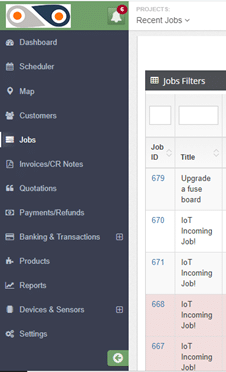
From your Dashboard, on the left-hand side you will see the menu option. Clicking on Jobs, will take you to all jobs carried out by your company.

FieldElite

The filters will allow you to view different categories of jobs:

  • Complaint– This means that there was an issue with on ground during the task delivery, and the client lodged a complaint.
  • On hold– Here, different aspects can cause a job to be paused- like when spare parts or equipment required for repair jobs have been ordered, and one needs to wait for them to be shipped in from a different location.
  • Pending– This is basically your in-tray, a list of jobs that are to be carried out.
  • In Progress– The technicians are on the ground, attending to the client’s needs, and you’re getting routine updates from them.
  • Incomplete– Though the job had been assigned to the required technician, it was not completed in the set amount of time, thus requiring an additional visit to the site. Given that the FSM solution increases the first-time fix rate, cases of ?incomplete tasks? are reduced.
  • Complete– The task is successfully done and the customer has appended their e-signature, and now it can be invoiced.
  • Cancelled Invoice– The head office determines that a particular invoice shouldn’t be paid, and thus cancels it.

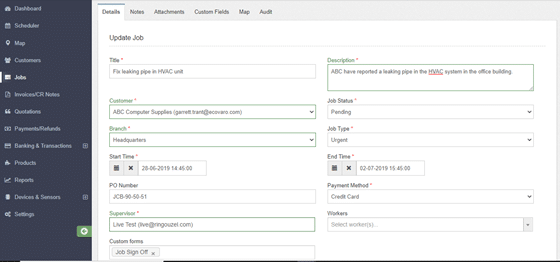
Our focus here is the pending tasks, so use this filter. ABC’s HVAC job will be among these. Clicking on its Job ID will open up the details of the task, with such an Update Job window:

FieldElite Job

This section contains all the information of the job- both past and present, which you can update in real-time. Any changes will be recorded by the system and can be viewed on the “Audit” tab.

As you can see here, the HVAC repair job is both “pending” and “urgent”. No one really likes sitting in an office that feels like an oven. Being the headquarters, it’s likely handles lots of foot traffic, and the damaged HVAC unit will make the working conditions really difficult. It’s best not to keep the client waiting, right?

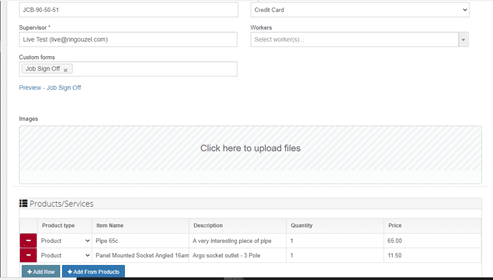
So, head on over to the Supervisor and Workers section (on the same “Details” tab), and select the personnel suited for the task.

FieldElite Job Details

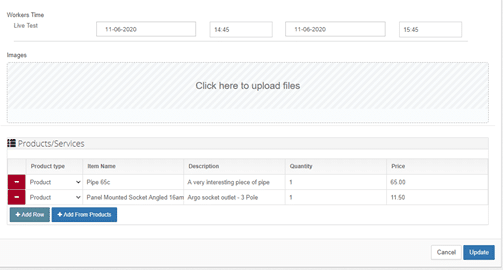
Set the time that the task will take for your technician, and once satisfied with the details of the job, click on Update. Voila! You’re done.

FieldElite Job Update

Immediately this happens, the worker received a notification on their app, telling them that they have been assigned the job.

From the app, the technician will be able to view the specifics of the HVAC job, including notes and attachments that you can add directly from your own dashboard, such as schematics of the building and reports from other technicians who installed the air conditioning system for the facility. You also get to add products that will be required for the task- like the pipe and panel mounted socket shown here. As the system also includes an inventory of the products used, their quantity and costs, you will be able to keep an accurate record of the supplies as they as are used.

As such, the field workers will not have to keep coming back to the central office to get documents and reports of new tasks, or walk around with bulky files. When they are carrying out the job, they will also be able to keep the staff at the office updated about its progress, through the chat feature on the mobile app, taking photos and adding notes as required.

2. Staff Scheduling

With this approach, the perspective is basically: ?So I have a couple of jobs- which of my employees has time to handle them?? The FSM allows you to optimise your productivity- by ensuring that you get the most out of the staff work hours, and avoid cases of jobs going into overtime.

Follow these steps:

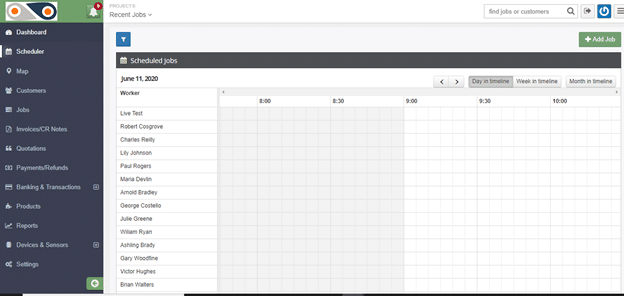
  1. Select ?Scheduler? from the left-hand side of the window. You will have a view of the workers of your company and how their day is planned out, and a summary of the unassigned jobs.

Here, you can tell whose busy, and who can have a new task assigned to them at the click of a button- which is far more effective than keeping on jotting down points in your diary or going through files of documents.

If the job has yet to be added to the system- like for the cases of new clients, simply click on the ?Add Job? button and key in its details.

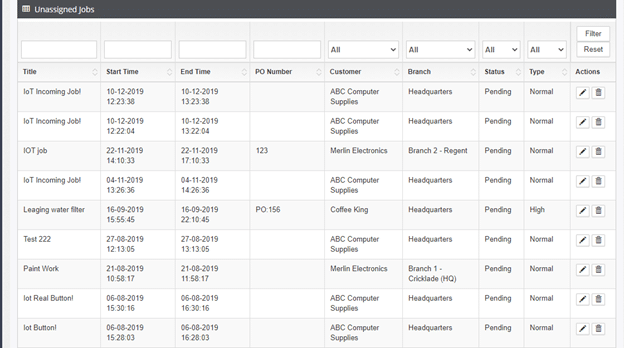
2. Scroll down, you will see a list of unassigned jobs.

unassigned jobs

3. Next, click on the edit button under ?Actions?. This will take you to the same ?Update Job? window described in the first approach, in order to assign the preferred worker to the role.

This real-time dispatching avoids cases of your desk getting cluttered with paper sheets, and prevents duplicate entries as each job has its own ID and task details- from the scheduling to the invoicing. In this case, your HVAC technician will have access to the information needed right at the palm of their hand, to ensure that the task at ABC?s head office goes seamlessly. The optimised schedule will enable the task to be carried out faster- restoring normalcy to your client’s facility.? In case the client’s location is on the route that one of your technicians takes while heading home, you can take advantage of this by giving them the task towards the end of their working day- thus clearing more of your backlog, sorting out your client, and easing your technician?s worries about getting home late.

As you can see, the field service scheduling software enables you to easily and efficiently handle your workflow, avoid the mess that is associated with manual documentation and cases of your employees getting conflicting schedules and overlaps- which would strain them and dampen their morale. Streamlining your workflow and standardising operations ultimately results in increased customer satisfaction.

Ready to work with Denizon?