A Definitive List of the Business Benefits of Cloud Computing – Part 2

Improves cash flow

The capital investment you put into an on-premise IT infrastructure is normally based on a long-range forecast of what your highest computing demands will be. But what if, as they often do, the estimates turn out to be too high? Then you’ll have to bear with the huge depreciation cost or monthly amortisation of a grossly underutilised asset for the next couple of years.

That’s why a cloud-based IT infrastructure is much better. With its on-demand, utility-based pricing model, cloud solutions provide companies with clearer financial visibility. You spend on something you’ve already fully utilised, not something you only hope to fully utilise in the future.

How exactly does cloud computing’s on-demand, utility-based pricing work? Well, it’s really very similar to the way you pay for electricity. Let me give you an example. In Amazon’s EC2 cloud offering, consumers are billed on what they call a per instance-hour basis.

Meaning, if some of your servers aren’t needed at night and only need to run 10 hours a day, then you can stop those server instances when the day is done. When you receive your bill, ?you’ll be charged the cost of only 10 hours per day x the number of days those servers were operational.

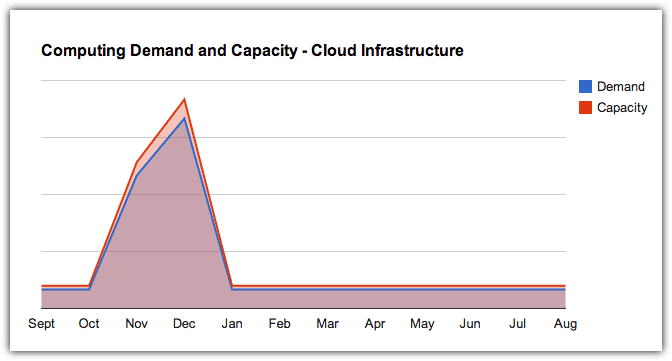
The advantages of OPEX-based IT spending gets even better when we start talking about businesses that experience sudden spikes or seasonal spikes in consumer demand as in the case of retail, marketing, logistics and others. If you’re running any of these businesses and the demand shoots up ?say during the Christmas season, you can readily scale up your servers, memory, storage, and other computing resources to the required capacity. Then when the season ends and demand goes back to normal, you can just as easily release those resources that are no longer needed.

demand and capacity - cloud infrastructure

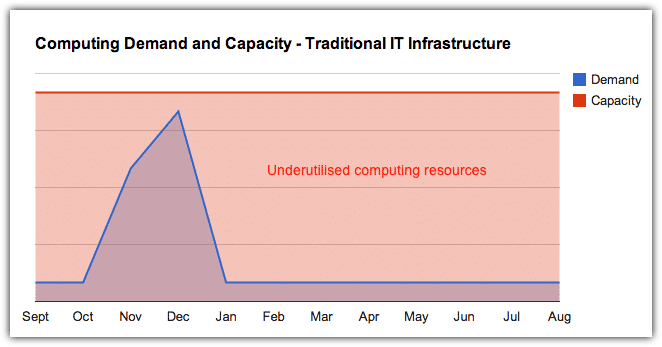
Compare that with a traditional IT infrastructure wherein you’d have to predict the highest possible computing demand for the next Christmas season and then build an infrastructure that can satisfy it. During the high months, your infrastructure may come out fully utilised. But what about the rest of the year after that?

demand and capacity - traditional IT infrastructure

Since cloud services are delivered and consumed on-demand, you’ll have more cash on hand than if you had invested in an on-premise IT infrastructure. That means more money to finance other operating expenses or other endeavors like Business Intelligence and analytics, marketing projects, sales incentives, IT innovations, store or office expansions, and many others.

Contact Us

  • (+353)(0)1-443-3807 – IRL
  • (+44)(0)20-7193-9751 – UK

Check our similar posts

Field service and its impact on your bottom line

There are many pointers to successful field service in any business. Generally, labour hours, parts, technician efficiency, performance indicators and other bunch of data are the most important. However, the icing on top is the total revenue. If you are in business, you must be cocksure that it’s making money, and when you don’t rake in enough you need to make some business decisions quick!

For the most part, field service companies will always have a field service management software to handle all the data. But how will this affect your outlook? 

Will this cause a direct increase in revenue? 

What will still need to be changed so that the ship stays afloat?

Increase your service jobs

As expected, the best field management software will guarantee a positive increase in appointments per week. On average, the field service team should expect at least a 50% increase in work turnover. There is a direct relation between the revenue you should be making and the number of calls in your schedule since the only way of making more cash is to get more work done. It is not recommended to raise costs because it increases the risk of losing customers easy when they can’t meet the extra expense. Field service software will help you bring in more customers and also manage technicians.

If you have much of the hard work done for you then you?d have more time to run the show. This is why premises are trying out software because they answer many problems like:

  • Automation and improved work order management
  • Fast dispatch from an array of drag-drop scheduling tools
  • Easy-to-use field service apps for technicians to receive and submit work orders
  • Can be integrated into account systems for faster billing time

Manual operations are costly and prone to error, and they don’t come cheap. Do away with them, reduce costs, sit back and watch as new customers steadily stream in. Grow the business by building lasting relations with your workforce and customers.

Increase technician?s abilities with mobile

If you want to get more profit, bank on technicians who complete service calls. Their task is obviously the hardest. They have an unpredictable job; at times they need to come up with quick responses or they may also be required to dig deep as well. The work does not need to be slowed with an endless paper trail while they could be elsewhere giving their all. These technicians require a working mobile field service management app.

As expected, field service leaders who use a mobile field service software report close to 20% increase in service visits per technician. This translates to each technician taking nearly a fifth more calls in a day. And as we had said before, more service calls can double the profits. How can technicians get extra time from a field service mobile app?

  • No need to drive to work to pick orders
  • Less time using the phone looking for service or parts information
  • Reduces the time needed to go through paper-based work
  • Less time driving to service calls because information is routed to their mobile phones

Increase revenue from technicians

If time is spent seamlessly, dispatchers will find time in a technician?s schedule for an extra service call. With all this being done within normal working hours, the business stands to increase its bottom line. This is what makes the business grow. Not by increasing technicians but by optimum utilisation of the current staff to get maximum profit. The logic is straightforward ? a technician working 8 hours each day taking six calls a day will make more revenue than the one who takes four, because they are paid the same each, but the business benefits from the extra service calls.


The business stands to make more revenue per technician if it uses field service management software. The margins can go as high as 40% because the technician has all tools needed to get the job done faster. You increase revenue from field work too. Let technicians benefit from automated process and have all the tools for work that they need right on their mobile devices.

The target is always your bottom line

When field service leaders inquire about field service software, they need to know how it affect the bottom line: how they will spend less time drafting schedules, how each technician will increase revenue, how the business will grow. Simple as that!
Field service management applications bring a lot to the table. 

Don’t waste your time crunching a lot of numbers or sorting out schedules since this is what such an application should do. Automation, optimisation and mobility are all ways of increasing revenue. Let us help you reach your goals using our top shelf field management software. This will not only help your bottom line but will let you have more time to venture into untapped potentials.

Job & Staff Scheduling with FieldElite Mobile Service Management Software

Field Service Management (FSM) software systems are designed to enable you to manage your mobile workforce from a central point- and do away with the paperwork involved with the process. They connect your technicians on the ground (via app on their phones), to the staff at the head office- who have an interactive dashboard accessed through their browsers. The office team will have access to all the jobs that are to be handled by the company, simplifying the management process and taking away the risks that come with manual data entry. Here, we will walk you through a quick process of scheduling a job for your personnel with FieldElite.

Say you are a HVAC contractor, licensed, bonded and insured. You’ve made quite a name for yourself in the industry, and have a wide range of clients- in both residential and commercial establishments. Consequently, you also have a large workforce to attend to the different situations- from installing to repair and maintenance. One of your clients- let’s call them ABC Computer Supplies, has an issue with their HVAC unit- perhaps a pipe is leaking. It needs to be fixed, and ABC have booked an appointment.? Your goal here is to get one of your personnel to handle the task as soon as possible, and this field service scheduling software comes in handy.

There are two approaches that you can take:

1. Job Scheduling

From your Dashboard, on the left-hand side you will see the menu option. Clicking on Jobs, will take you to all jobs carried out by your company.
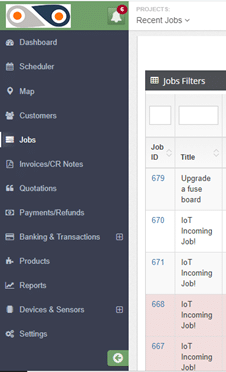
FieldElite

The filters will allow you to view different categories of jobs:

  • Complaint– This means that there was an issue with on ground during the task delivery, and the client lodged a complaint.
  • On hold– Here, different aspects can cause a job to be paused- like when spare parts or equipment required for repair jobs have been ordered, and one needs to wait for them to be shipped in from a different location.
  • Pending– This is basically your in-tray, a list of jobs that are to be carried out.
  • In Progress– The technicians are on the ground, attending to the client’s needs, and you’re getting routine updates from them.
  • Incomplete– Though the job had been assigned to the required technician, it was not completed in the set amount of time, thus requiring an additional visit to the site. Given that the FSM solution increases the first-time fix rate, cases of ?incomplete tasks? are reduced.
  • Complete– The task is successfully done and the customer has appended their e-signature, and now it can be invoiced.
  • Cancelled Invoice– The head office determines that a particular invoice shouldn’t be paid, and thus cancels it.

Our focus here is the pending tasks, so use this filter. ABC’s HVAC job will be among these. Clicking on its Job ID will open up the details of the task, with such an Update Job window:
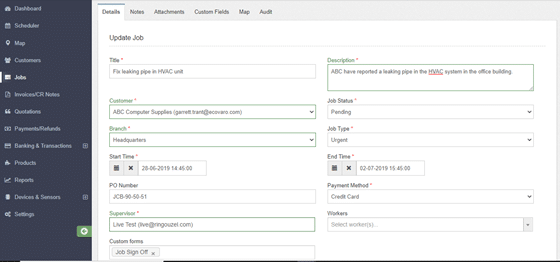
FieldElite Job

This section contains all the information of the job- both past and present, which you can update in real-time. Any changes will be recorded by the system and can be viewed on the “Audit” tab.

As you can see here, the HVAC repair job is both “pending” and “urgent”. No one really likes sitting in an office that feels like an oven. Being the headquarters, it’s likely handles lots of foot traffic, and the damaged HVAC unit will make the working conditions really difficult. It’s best not to keep the client waiting, right?

So, head on over to the Supervisor and Workers section (on the same “Details” tab), and select the personnel suited for the task.
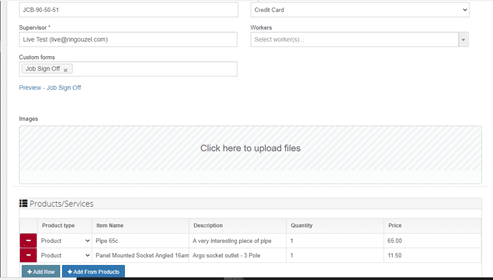
FieldElite Job Details

Set the time that the task will take for your technician, and once satisfied with the details of the job, click on Update. Voila! You’re done.
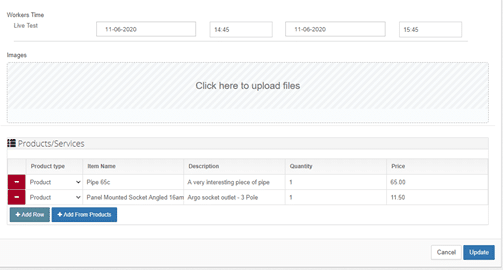
FieldElite Job Update

Immediately this happens, the worker received a notification on their app, telling them that they have been assigned the job.

From the app, the technician will be able to view the specifics of the HVAC job, including notes and attachments that you can add directly from your own dashboard, such as schematics of the building and reports from other technicians who installed the air conditioning system for the facility. You also get to add products that will be required for the task- like the pipe and panel mounted socket shown here. As the system also includes an inventory of the products used, their quantity and costs, you will be able to keep an accurate record of the supplies as they as are used.

As such, the field workers will not have to keep coming back to the central office to get documents and reports of new tasks, or walk around with bulky files. When they are carrying out the job, they will also be able to keep the staff at the office updated about its progress, through the chat feature on the mobile app, taking photos and adding notes as required.

2. Staff Scheduling

With this approach, the perspective is basically: ?So I have a couple of jobs- which of my employees has time to handle them?? The FSM allows you to optimise your productivity- by ensuring that you get the most out of the staff work hours, and avoid cases of jobs going into overtime.

Follow these steps:

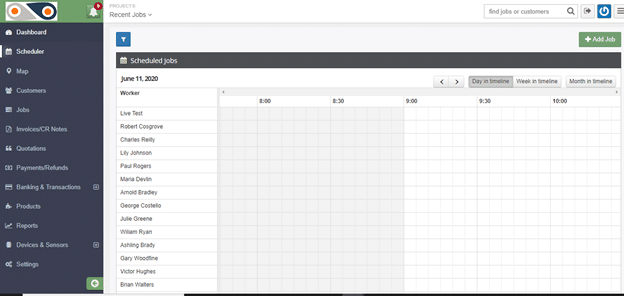
  1. Select ?Scheduler? from the left-hand side of the window. You will have a view of the workers of your company and how their day is planned out, and a summary of the unassigned jobs.

Here, you can tell whose busy, and who can have a new task assigned to them at the click of a button- which is far more effective than keeping on jotting down points in your diary or going through files of documents.

If the job has yet to be added to the system- like for the cases of new clients, simply click on the ?Add Job? button and key in its details.
2. Scroll down, you will see a list of unassigned jobs.
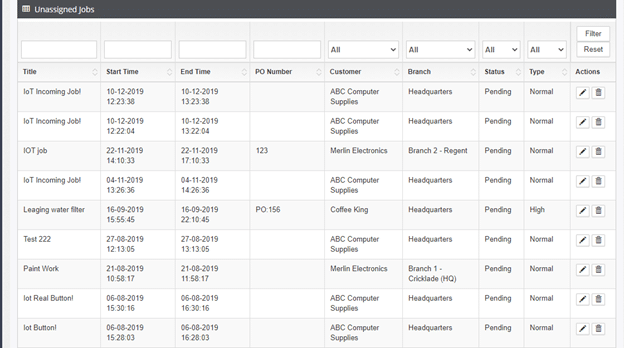
unassigned jobs

3. Next, click on the edit button under ?Actions?. This will take you to the same ?Update Job? window described in the first approach, in order to assign the preferred worker to the role.

This real-time dispatching avoids cases of your desk getting cluttered with paper sheets, and prevents duplicate entries as each job has its own ID and task details- from the scheduling to the invoicing. In this case, your HVAC technician will have access to the information needed right at the palm of their hand, to ensure that the task at ABC?s head office goes seamlessly. The optimised schedule will enable the task to be carried out faster- restoring normalcy to your client’s facility.? In case the client’s location is on the route that one of your technicians takes while heading home, you can take advantage of this by giving them the task towards the end of their working day- thus clearing more of your backlog, sorting out your client, and easing your technician?s worries about getting home late.

As you can see, the field service scheduling software enables you to easily and efficiently handle your workflow, avoid the mess that is associated with manual documentation and cases of your employees getting conflicting schedules and overlaps- which would strain them and dampen their morale. Streamlining your workflow and standardising operations ultimately results in increased customer satisfaction.

What ISO 14001 Status did for Cummins Inc.

Cummins manufactures engines and power generation products, and has been a household name almost since inception in 1919. It sells its products in over 300 countries, through approximately 6,000 dealerships employing 40,000 people. Because its product line runs off fossil fuel it is under steady pressure to display a cleaner carbon footprint.

Cummins decided to go for the big one by qualifying for ISO 14001 certification. This is a subset of a family of standards relating to managing environmental impact while complying with all applicable legislation. In this sense, it is similar to the ISO 9000 quality management system, because it focuses on how products are produced (as opposed to how those products perform). Compliance with ISO 14001 was a doubly important goal, because it is part of the European Union?s Eco Management and Audit Scheme and fast becoming mandatory on suppliers to governments.

The qualification process follows the well-established principle of plan, do, check, act. It begins with gap analysis to detect materials and processes that affect the environment. This is followed by implementation of necessary changes affecting operations, documentation, emergency strategies and employee education. The third step involves measuring and monitoring performance. Finally, the project moves into a phase of ongoing maintenance, and continuous improvement as circumstances change.

In Cummins case, the project was almost worldwide and called for environmental, health and safety reporting throughout the organisation. The information was shared via a globally accessible document repository, and then processed centrally at the head office in Columbia, Indiana USA.

Measuring environmental performance almost inevitably has other benefits that make it doubly worthwhile. Speaking at the 2014 National Safety Council Congress after receiving the top award for excellence, Cummins chairman and ceo Tom Linebarger commented on a journey that was ?nothing short of amazing? yet wasn’t even a ?pathway to the finish line?.

?All of us feel like we have way more to do to make sure that our environment is as safe as it could be,? he added, ?so that our sustainability footprint is as good as it can be and that we continue to set more aggressive goals every year. That’s just how we think about it.? Linebarger concluded.

If you are taking your company on a journey to new heights of environmental excellence, then you should consider choosing ecoVaro as your travelling companion. We are environmental management specialists and have proprietary software geared to process your data. We also have a wealth of experience, and a treasure chest of roadmaps to help you achieve your goal.

Ready to work with Denizon?